Moving the Observer Using the Mouse (3D Projection)
You can change the observer’s position and orientation with the mouse. (To see the full list of mouse mappings, view the Mouse Mappings page on the Application Settings dialog box.)
Using the mouse, you can:
- Drag the terrain
- Drag the view
- Orbit the terrain
- Change orientation
- Teleport (jump)
Dragging the Terrain
Dragging the terrain combines the move forward, backward, left, and right functions.
Procedure 49: Dragging the Terrain
-
Click a point on the terrain and hold down the left mouse button.
-
Drag the mouse left, right, forward, and backward.
Note: Dragging the terrain is most effective when you are moving large distances, such as several kilometers. To move small distances, use the keyboard.
Disabling Terrain Dragging
There may be times when you want to disable terrain dragging.
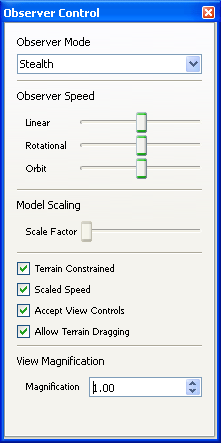
To disable terrain dragging, on the Observer Control Panel, clear the Allow Terrain Dragging checkbox (Figure 41).
Figure 41: Observer Control Panel
Changing the Observer’s Orientation with the Mouse
To change the observer’s orientation, hold down the right mouse button and drag the mouse. The observer rotates in the direction you drag the mouse.
Dragging the View
Dragging the view combines the observer up, down, left, and right movement functions. Unlike dragging the terrain, which requires you to click a point on the terrain, you can drag the view from any observer location.
To drag the view, hold down the middle mouse button (or wheel) and drag the mouse.
Orbiting the Terrain with the Mouse
To orbit the terrain with the mouse, press Ctrl and drag the mouse.
Teleporting the Observer
You can teleport the observer to an entity, a prop, or a place on the terrain. Teleporting moves the observer 90% of the way from its current position to the location or object clicked on.
To teleport the observer:
Shift+click on the terrain or prop that you want to jump toCtrl+Shift+click on the entity that you want to jump to.