Creating a DPT Ring
A “DPT ring creator” utility is available as part of the SRP model suite.
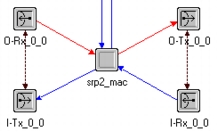
Using the DPT ring creator feature is the preferred method for creating the backbone ring representing the DPT network. Rings created using this utility will have no configuration problems unless incorrect node models are used. The node models that can be used with this utility must have an SRP MAC layer interface with the transceiver name assignments as shown in the following figure.
Figure 531: SRP MAC Layer Interface Transceiver Name Assignments
Procedure 110: Creating a DPT Ring
-
In the Project Editor, choose Protocols > Create DPT Ring.
-
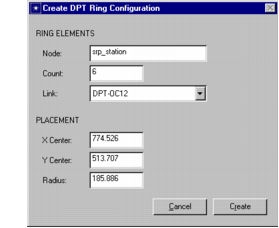
Specify the desired settings in the Create DPT Ring Configuration dialog box, as follows.
Figure 532: Create DPT Ring Configuration Dialog Box
Ring Elements
- Node—Specifies the node model to use for all ring nodes. The node model can be one of the standard SRP node models that ships with the software or it can be a model that you have created, provided it has a properly configured SRP interface. Use Procedure 111 to add a custom node to the list.
- Count—Specifies the number of nodes in the DPT ring.
- Link—Specifies the link model to use to connect the nodes of the ring. Use Procedure 112 to add a custom link to the list.
Placement
- The placement specifications, X Center, Y Center, and Radius, default to the center of the visible Project Editor workspace, but can be changed to reflect specific topological details.
-
Click the Create button. A counter-rotating DPT ring network is created.
End of Procedure 110
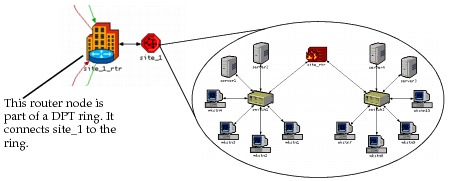
For the ring in Figure 533, the srp_station node was specified as the node in the Create DPT Ring Configuration dialog box. However, if you select a router node model as the periphery node, you can attach other nodes compatible with and supported by the ring nodes once the ring is created. In Figure 534, a router node is the specified node model. The router node is connected to a subnet, which contains the network topology shown.
Figure 533: A DPT Ring Created with the srp_station Node Model
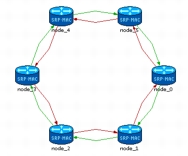
Figure 534: Subnet Connected to the Router Node of a DPT Ring
Procedure 111: Adding Nodes to the DPT Ring Creator Utility
- Choose File > Open and select Generic Data File from the “Files of type” pull-down menu.
- Open the file
<install_dir>\<release>\models\std\srp\srp_node_collection.gdf. - Add the new devices (node or derived node model names, without any extensions) to the file.
- Save the file and exit the GDF Editor.
End of Procedure 111
Procedure 112: Adding Links to the DPT Ring Creator Utility
-
In an edit pad (Edit > Open Edit Pad) or any text editor, open the file
<install_dir>\<release>\models\std\srp\dpt_ring_create.ets. -
Find the following line (around line number 97):
entries: “DPT-OC12,DPT-OC48,DPT-SONET_OC12,DPT-SONET_OC48” -
Add the new link names to the list.
-
Save the file and exit the editor.
End of Procedure 112