Creating the Network Model
Wireless LAN topologies cannot be created using the import features in Riverbed Modeler. Use the following steps to create your wireless network:
Create a Blank Scenario
You can use the Startup Wizard to create a blank project and scenario by choosing File > New... from the menu. Creating a network topology for MANET is similar to creating any other network topology. Be aware that to set geographic size for the model, you must select the following in the Startup Wizard:
- Initial Topology—Choose Create Empty Scenario
- Choose Enterprise, Campus, or Office.
You will be prompted for dimensions.
Add Nodes to the MANET
There are three ways to populate a MANET:
- Automatically—The wireless wizard is the preferred method for deploying a WLAN ad hoc network and is described in “Wireless Network Deployment” on page 39.
- Manually—To create a MANET manually, open the object palette. Drag and drop objects from the palette into the Project Editor workspace. The MANET objects available in the object palette are described in Node Models.
- Programmatically, using EMA—You can use External Model Access (EMA) to add a number of nodes to a model. For more information about this option, see “External Model Access” on page 1. You can also use the OPNET Development Kit to add nodes to a network model. For more on this option, refer to Ets_Obj_Install() on page 1021.
Configuring Node Mobility
If you used the wireless wizard to create your MANET, you configured node mobility as part of the workflow. Otherwise, use the manual process described below.
Manually Configuring Node Mobility
- Once you have a populated network model, you can change the position of nodes or specify node mobility. You can do this by
- Configuring random mobility, as described in “Random Mobility” on page 28.
- Configuring trajectories, as described in “Trajectories” on page 14.
- Directly manipulating the node position, as described in “Direct Manipulation of Position Attributes” on page 31.
Configuring Terrain
The final step in configuring your MANET model is modeling the terrain, as described in “Enabling Terrain Effects in a Simulation” on page 7.
Setting the Transmission Range of Nodes
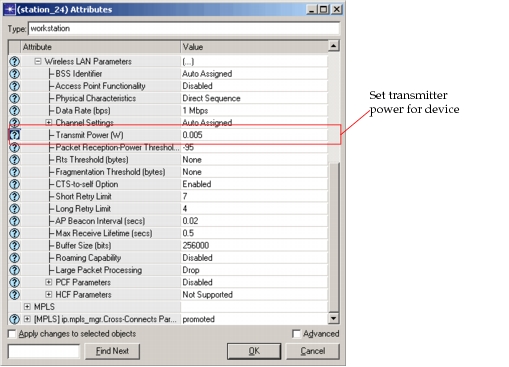
You can configure the transmitter power on each MANET device. To do this, right-click on the device and select Edit Attributes. Expand the Wireless LAN Parameters compound attribute, then set the Transmit Power attribute.
Figure 364: Setting Transmitter Power