Analyzing IPv6 Configuration
The model includes several features that you can use to analyze IPv6 network topologies. They are
- Statistics
- Routing protocol visualization
- Address configuration reports
Available Statistics (DES)
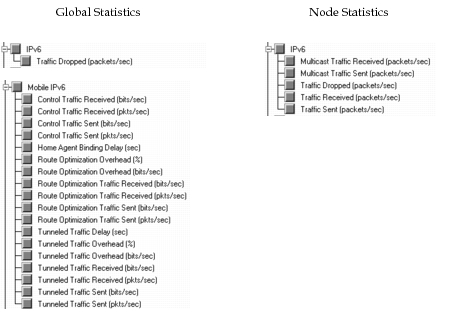
The following global and node statistics are available for IPv6.
Figure 298: IPv6 Statistics
You can also collect statistics for the individual routing protocols in the network on a global, per-node, or per-process basis.
Available Reports (Flow Analysis)
The following reports are available when running a flow analysis for MPLS networks.
Configuration reports:
- IPv6 Router Address
- IPv6 Static Routes
- IPv6 Subnets
Performance reports:
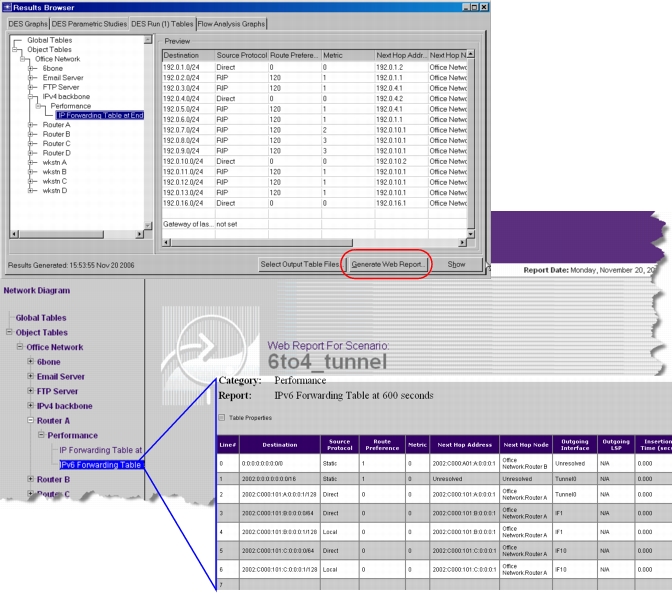
- IPv6 Forwarding Table
Visualizing IPv6 Configuration in the Workspace
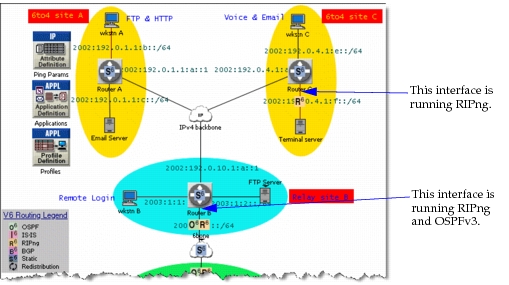
You can see which routing protocols are configured on IPv6 physical interfaces by using the View > Visualize Protocol Configuration > IP Routing Protocols > IPv6 Routing Protocols menu operation. This feature adds icons in the Project Editor workspace that indicate which routing protocols are configured in the IPv6 network.
Note: This feature applies to IP routing protocols only—it does not show the MANET protocols configured in an IPv6 network.
Figure 299: Viewing Routing Protocol Configuration for IPv6
Visualizing IPv6 Routes for Traffic Flows
Discrete Event Simulation
To view the routes computed by discrete event simulation for traffic flows in the network, use the following operation:
- Protocols > IP > Demands > Display Routes for Configured Demands
Flow Analysis
To view IPv6 routes computed by flow analysis, use the following operation:
- Flow Analysis > Show Routes Between Selected Nodes
You can also access route visualizations from the Route Browser (Flow Analysis > Open Route Browser…).
For more information about these feature, see “Viewing Traffic Routes”.
IPv6 Interface Configuration Reports
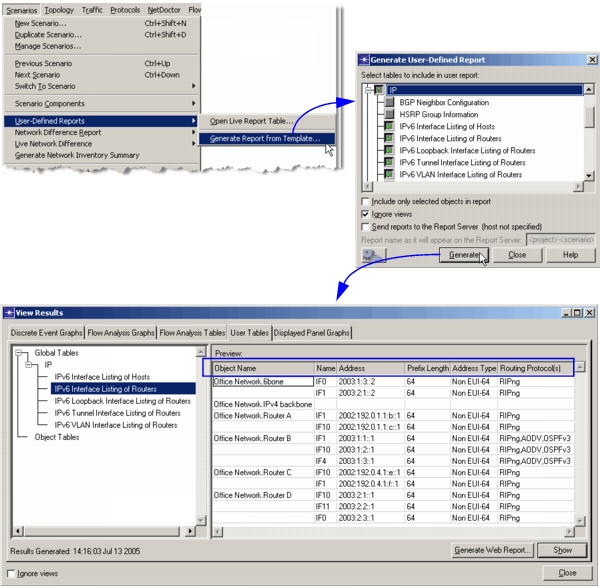
The software can generate reports that list the addresses and routing protocols configured on IPv6 interfaces. This feature is especially helpful when you use the Auto-Assign IPv6 Addresses feature and need to know the address that was assigned to a particular interface.
Figure 300: Generating IPv6 Interface Configuration Reports
In addition to address configuration reports, you can also view the IPv6 forwarding table report and IPv6 routing tables for each protocol after running a simulation. For more information on generating forwarding tables, see “Step 3: Generate Simulated Forwarding Tables with a Flow Analysis or Discrete Event Simulation” on page 107 in the “Validating Simulated Routing Against Operational Data” workflow.
Figure 301: Forwarding Table Report from DES