Using Mobile IPv6
Configuring Mobile IPv6 (MIPv6)
The following mobility features are supported:
- Route optimization
- Mobile node (MN)—home agent (HA) bi-directional tunneling
- IPv6 extension headers
- Mobility extension headers
- Routing (type 2) and destination option extension headers
- IPv6
- Neighbor discovery
- Router advertisements (movement detection, address auto-configuration (stateless), home agent address detection)
- Duplicate address detection (modeled as a delay)
Mobile Nodes
Use the following procedure to configure a WLAN workstation or server node as an MIPv6 mobile node.
Procedure 71: Configuring a Mobile Node
- Open the Attributes dialog box for the node.
- Set the IP > Mobile Host Node Parameters > Mobile IPv6 Parameters > Node Type attribute to Mobile Node.
- Set the IP > Mobile Host Node Parameters > Mobile IPv6 Parameters > Route Optimization attribute to Enabled or Disabled.
- If the mobile node is initially away from home and more than one access point exists, specify the address of the home agent (IP > Mobile Host Node Parameters > Mobile IPv6 Parameters > Home Agent Address). This can be learned from the home agent’s router advertisements when at home but needs to be specified if the mobile node is initially away from home.
- (optional) Configure binding and return routability test parameters.
- IP > Mobile Host Node Parameters > Mobile IPv6 Parameters > Binding Parameters
- IP > Mobile Host Node Parameters > Mobile IPv6 Parameters > Return Routability Parameters
- (optional) Specify the Mobility Detection Factor (IP > Mobile Host Node Parameters > Mobile IPv6 Parameters > Mobility Detection Factor). This is the number of lost router advertisements that constitute a Layer-3 handover indication.
- If the mobile node is initially away from home and more than one access point exists on the network, specify the global address of the mobile node (IP > IP Host Parameters > Interface Information > IPv6 Parameters > Global Address(es) > Address). This address should use the same network prefix as the home agent.
- Enable WLAN roaming on the node (Wireless LAN > Wireless LAN Parameters > Roaming Capability.
End of Procedure 71
Correspondent Nodes
Wireless and non-wireless workstations and servers can be configured as correspondent nodes. To configure a node as a correspondent node, set the IP > Mobile Host Node Parameters > Mobile IPv6 Parameters > Node Type attribute to Correspondent Node.
Route optimization can be enabled or disabled for correspondent nodes. All regular workstation nodes behave as correspondent nodes with no route optimization support.
Home/Foreign Agents
Home agent functionality is configurable on a per-interface basis for router nodes. A router can have many interfaces that act as home agents; each needs to be configured individually. The home agent interface can be a wired interface or a wireless interface.
An interface is configured as a home agent through the IP > Mobile IP Router Parameters > Mobile IPv6 Parameters attribute. You need to specify the name of the interface that will act as home agent within this attribute. The following figure shows how to configure a home agent.
Figure 297: Configuring a Home Agent
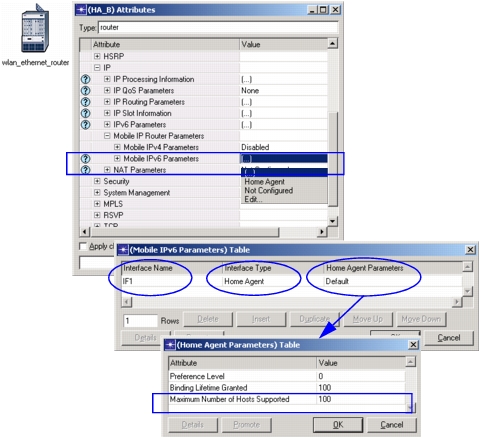
Home and foreign agents also need to have router advertisements enabled so that mobile nodes can learn of the closest home agent. The Router Advertisement Parameters attribute (IP > IPv6 Parameters > Interface Information > Router Advertisement Parameters) lets you enable/disable router advertisements and configure how often advertisements are sent.
Observe the following guidelines when configuring router advertisement intervals:
- Router advertisement intervals should be set to a value that is short enough to keep the routing tables accurate. If the router advertisement interval is too big, nodes locations may change too much before an update is sent.
- The Advertise Interval attribute should be set to Auto-Calculate.
- The IPv6 ND Simulation Efficiency simulation attribute should be set to Disabled.
Mobility Parameters
Mobility-related parameters play a role in call handoff. They are
- Router advertisements and advertise interval on routers
- Mobility detection factor on hosts
- Route Optimization
- WLAN roaming capability on 802.11 based mobile nodes.
Router Advertisements, Advertise Interval, and Mobility Detection Factor
These attributes are essential for Layer-3 handoff. If the router advertisements that a mobile node receives include an Advertisement Interval option, the mobile node uses its Advertisement Interval field to indicate the frequency with which it should expect to receive future advertisements from that router. If a mobile node does not receive a router advertisement for advertise_interval * mobility_detection_factor time, it concludes that it has moved away from the router. It then seeks router advertisements from a new router.
Route Optimization
This attribute lets mobile IPv6-capable correspondent nodes communicate directly with mobile nodes (without being routed through the home agent). If this is not enabled, bi-directional tunnels are established between the mobile node and its home agent. Traffic is always routed through the home agent. This attribute is configured in the Mobile IP Host Parameters attribute of a correspondent node. A mobile node informs the correspondent node about its new prefix after a Layer-3 handoff.
WLAN Roaming Capability on 802.11-Based Mobile Nodes
This attribute is essential for Layer-2 handoff. You can enable roaming in the Wireless LAN > Wireless LAN Parameters > Roaming Capability attribute on mobile nodes.