Configuring Simulations for IPv6 Networks
Discrete Event Simulations
Several attributes are available in the Configure/Run DES dialog box that allow you to customize your simulation for your IPv6 network model. The following figure shows the compound attributes used to configure DES for IPv6. Specific attributes are listed in Table 125.
Figure 294: Configuring Discrete Event Simulations for IPv6
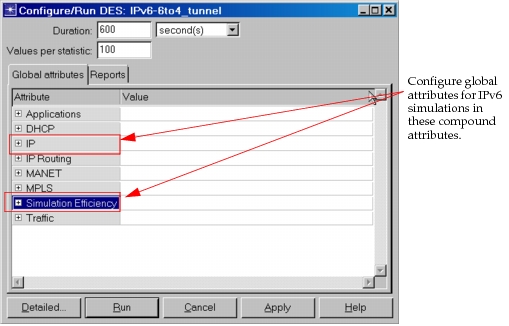
Table 125: Global Attributes for IPv6 Networks
| Attribute | Description |
|---|---|
| IP > IPv6 Configuration | Specifies whether IPv6 configuration is considered during the simulation run. By using this attribute, you can turn IPv6 off globally in the network model without having to delete IPv6 configuration on each node. This attribute is set to “Consider” by default. If set to “Ignore”, the IPv6 configuration is not read. |
| IP > IPv6 Interface Address Export | Specifies whether to export the IPv6 addresses of each interface in the network to a gdf file, When set to enabled, a file named <project>-<scenario>-ipv6_addresses.gdf is created. |
| IP > IP Version Preference | Used to determine the source and destination IP addresses to set up a conversation, when addresses are auto-assigned. If both the source and the destination support both IPv4 and IPv6, then this attribute determines which version is to be preferred. If either one of them supports only one version, then that version will be used to send the traffic. |
| Simulation Efficiency > IPv6 ND Simulation Efficiency | Specifies whether to translate IPv6 addresses to MAC addresses using a global table (NATO table) rather than through the use of explicit neighbor solicitation/advertisement messages. When set to “Enabled” the global table is used. This can help speed up the simulation. |
Flow Analysis
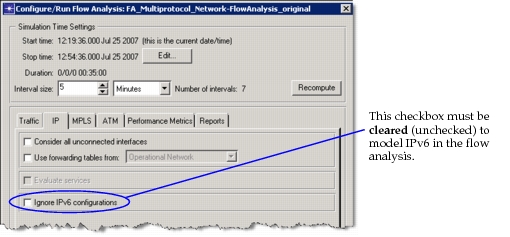
When running flow analysis on IPv6 networks, you can control whether IPv6 is modeled during the simulation.
Figure 295: Configuring Flow Analysis for IPv6