Configuring IPv6 Routing Protocols
You can configure IPv6 interfaces to one or more of the following protocols for routing in IPv6 networks:
- RIPng
- OSPFv3
- IS-IS
- AODV
- DSR
- OLSR
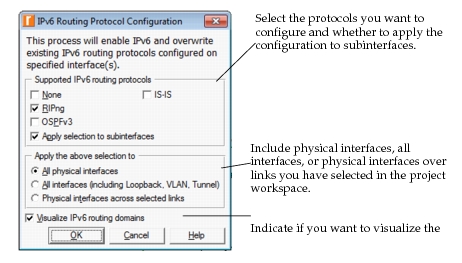
Routing protocol configuration for IPv6 is very similar to that for IPv4. The following sections describe the minimal configuration requirements for designating routing protocols in IPv6 networks. To configure IPv6 routing protocols, select Protocols > IP > IPv6 > Configure IPv6 Routing Protocols… The dialog box appears as shown in the following figure.
Figure 292: Configure IPv6 Routing Protocols
For additional information, see the attribute descriptions in the software or the following topics:
- Chapter 29 “RIP” on page 1
- Chapter 27 “OSPF” on page 1
- Chapter 5 “BGP” on page 1
- Chapter 19 “IS-IS” on page 1
- Chapter 25 “MANET” on page 1 (for AODV, DSR, and OLSR)
If you prefer to configure the IPv6 routing protocols manually on interfaces, use the following procedure.
Procedure 65: Manually Designating a Routing Protocol on an IPv6 Interface
-
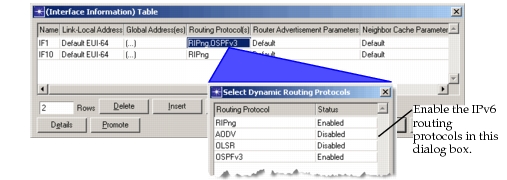
Enable the desired routing protocol(s) in the Routing Protocol(s) attribute on the interface. RIPng is the default routing protocol on all IPv6 interfaces. The location of the Routing Protocol attribute varies according to the type of interface as follows:
-
Physical Interfaces: IP > IPv6 Parameters > Interface Information > Routing Protocol(s)
-
Subinterfaces: IP > IPv6 Parameters > Interface Information > Subinterface Information > Routing Protocol(s)
-
Loopback Interfaces: IP > IPv6 Parameters > Loopback Interfaces > Routing Protocol(s)
-
Tunnel Interfaces: IP > IPv6 Parameters > Tunnel Interfaces > Routing Protocol(s)
Figure 293: Specifying Routing Protocols for an IPv6 Interface
-
-
Configure protocol parameters for the enabled IPv6 protocols.
-
RIPng is configured in the IP Routing Protocols > RIPng Parameters attribute of each router.
-
OSPFv3 is configured in the IP Routing Protocols > OSPF Parameters attribute.
-
To use OSPFv3, the process running on the IPv6 interface must have its Version attribute set to v3.
-
(IPv6-only nodes) If a router does not have any IPv4 addresses (that is, if all IPv4 addresses are set to “No IP Address”), specify a Router ID in the IP > IP Routing Parameters > Router ID attribute. OSPFv3 uses the router ID when flooding link state advertisements, but the router ID always defined when there is at least one IPv4 interface.
-
-
BGP is configured in the IP Routing Protocols > BGP Parameters attribute.
-
IS-IS must have a Network Entity Title, which is entered in IP Routing Parameters > IS-IS Parameters > Processes > Process Parameters > Network Entity Titles.
-
AODV is configured in the AD-HOC Routing Parameters > AODV Parameters attribute on MANET-capable nodes.
-
DSR is configured in the AD-HOC Routing Parameters > DSR Parameters attribute on MANET-capable nodes.
-
OLSR is configured in the AD-HOC Routing Parameters > OLSR Parameters attribute on MANET-capable nodes.
-
End of Procedure 65