Frequently Asked Questions: TCP
Question: My simulation generated retransmission-related simulation log messages like the one shown below. What should I do?
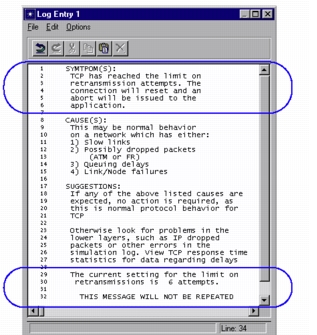
Answer: Note that each TCP process specifies criteria limiting the time for which retransmission of a segment is attempted. The limit is either in terms of a maximum number of attempts or a time interval. Once this threshold is reached, the TCP connection is aborted. Different thresholds exist for control (e.g., SYN) versus data segments.
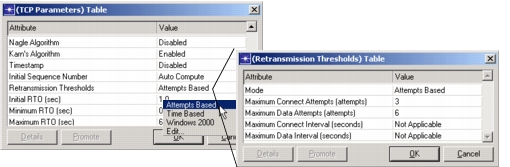
The above simulation log results after a TCP process has made six unsuccessful attempts to transmit the same segment. If you think your network can recover from limits greater than the default values specified for this attribute, change the default on the node models using the “Retransmission Threshold” sub-attribute in the “TCP Parameters” attribute. Note that this threshold setting is typically set to “Attempts Based” on Windows systems, and “Time Based” on UNIX systems.
Figure 556: Transmission Thresholds Table
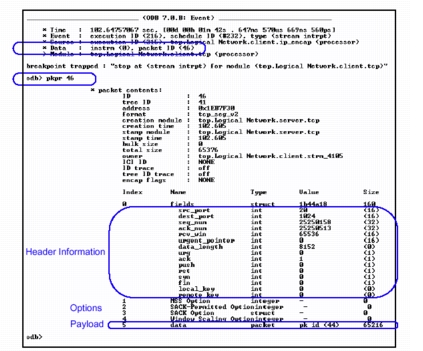
Question: I need to inspect the TCP packets present in the network; how can I check the contents of each TCP packet?”
Answer: Each TCP segment contains a TCP header, options and data field. When running the simulation under the control of ODB, you can use the pkprint command to print the contents of a TCP segment. It shows detailed information about the contents of the segment header, options, and contained payload information:
Figure 557: Pkprint of the Contents of a TCP Segment
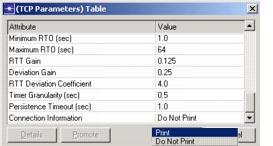
Question: I would like to obtain information about all connections managed by TCP—is there a way to print this information?
Answer: Set the “TCP Connection Information” attribute to “Print”—this prints a list of TCP connections running in the surrounding node. The list is printed in the console from which Riverbed Modeler was launched.
Figure 558: TCP Connection Information
Question: What is the difference between “TCP” Statistics and “TCP Connection” Statistics?
Answer: The “TCP Connection” group contains per-connection statistics (i.e., these are recorded separately per TCP connection), whereas statistics under “TCP” group represents TCP performance across all connections within a given node for which this statistic is collected.
For more information in the next sections, see: