Cyber Effects Profiles
The Cyber Effects model uses profiles to specify the actions that comprise attacks and remedies. Profiles are defined in layers. This gives you flexible control over not only what effects the profile contains, but also when, where, and even if the effects will be applied.
A profile represents all of the actions that comprise a specific attack or remedy. This lets you define the attack or remedy once and use it wherever needed.
To execute an attack or remedy in your simulation, you specify its profile using the Cyber Effects attribute on each node that will execute the profile. Along with the profile, you specify a start time for the profile.
You define profiles with the Cyber Attack Profiles and Cyber Remedy Profiles compound attributes on the Cyber Effects configuration node (see Cyber Effects Configuration Attributes. Both attack and remedy profiles have a similar structure. The primary difference is the intent of the effects they contain.
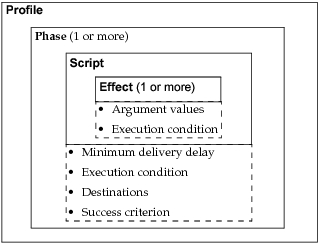
Figure 119 shows the hierarchy of components that compose attack and remedy profiles. The following sections describe these components.
Figure 119: Anatomy of a Cyber Profile
Effects
Effects are the basic unit of action for cyber effects modeling. They interact directly with protocols, applications, and devices to change their behavior for better (as a remedy) or for worse (in an attack). Support for effects is built into special cyber models in the model library (see Cyber Effects Objects). Built-in effects can perform actions such as:
- Infect a device
- Modify the IP forwarding rate
- Generate traffic to a device
You can extend support to additional models or add custom effects by using the supplied API, as described in Creating Custom Cyber Effects.
One or more effects are grouped in scripts for delivery to destination nodes.
Scripts
A script specifies one or more effects that will be applied as a group. For each effect, the script specifies argument values and a condition that controls whether that effect will be executed. A script can contain a single effect, or it might use several effects to achieve some larger goal (such as infect a device, then make it generate traffic).
A typical attack script might perform actions such as attempting to infect a group of devices and sending confirmations from those that are infected successfully. A remedy script might scan certain nodes and remove infections if they are found.
In addition to being a part of profiles, scripts can be specified locally on nodes. If you have effects that you want to run on a specific node, you can specify a local script on the node. In this case, the node will run the script itself rather than send it to other nodes (as it would if the script were part of a profile). One use for local scripts is to simulate anti-virus software by running remedy effects at specific times.
Regardless of where they are specified (in a profile or locally), you define scripts with the Cyber Effects Script attribute on the Cyber Effects configuration node (see Cyber Effects Configuration Attributes).
Phases
Phases let you define the sequence of events within an attack or remedy. Each phase specifies a single script to be delivered, along with information including:
- Simulation time when the script should be delivered (given as a minimum delay from the start of the profile). The actual delivery time might be later, if this phase must wait for an earlier phase to finish execution.
- Whether delivery of the script to destination nodes should always happen or be based on the result of an earlier phase in the profile
- Destinations (target nodes) that should receive the script
- What action determines successful execution of the phase
By adding this information to a script, phases let you customize scripts for use in different attacks or remedies and in different networks.