Adding Cyber Modeling to a Node
If you want to add cyber modeling support to a process model, you’ll need to add some infrastructure before you begin defining your custom effect. These are the things you’ll need to add. (The examples mentioned below can be found in ip_rte_central_cpu.pr.m.)
Node Model
Add a cyber_effects_mgr module to the node, as shown in Figure 124.
Process Model
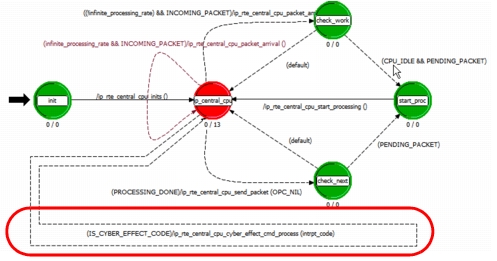
Add new state transitions to process cyber events. Each unforced (“red”) state that occurs after initialization is complete needs to process incoming cyber interrupts.
Figure 128: Cyber Event State Transition in ip_rte_central_cpu.pr.m
Header Block
Define a transition condition (for example, IS_CYBER_EFFECT_CODE). In addition, you might need to modify other transitions to exclude cyber events (as in PROCESSING_DONE).
Also, add #include "cyber_effects.h".
External Files
Declare the external files cyber_effects_cmd_api and cyber_effects_support.
State Variables
Add a variable for a pointer to the cyber-effects manager.
Table 37: State Variable
| Type | Name | Comments |
|---|---|---|
CyberT_Effect_Mgr* |
effects_mgr_ptr | /* Handle to the Cyber Effects manager. */ |
You might also need a pointer to data that will be used to return the process to its original state when the effect is cancelled (such as effects_cancel_data_ptr).
Function Block
Add a function that will be executed to process the event (for example, ip_rte_central_cpu_effect_cmd_process()). This function should set up any data needed by the effect and call cyber_effects_cmd_process().
The function block is also where you set the effects_mgr_ptr state variable and test for the presence of a CEM module before registering your custom effect.