Defining Attack and Remedy Profiles
Attack and remedy profiles are defined on the Cyber Effects configuration node. The following figure shows an overview of the attributes used to define profiles (attack and remedy profiles have the same structure). Descriptions of the attributes are given in Cyber Effects Configuration Attributes. Detailed steps are provided in Procedure 27.
Figure 121: Attributes for Cyber Attack Profiles
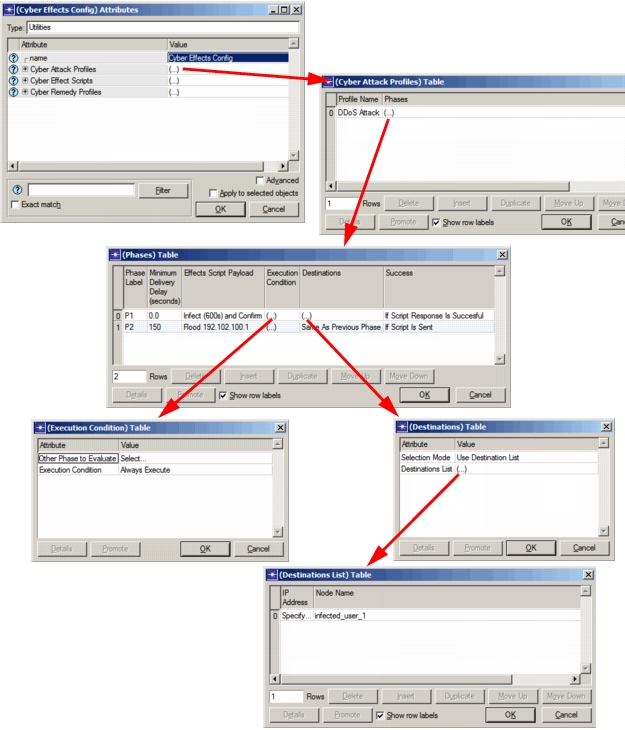
Procedure 27: Defining an Attack or Remedy Profile
-
Left-click on the Cyber Effects configuration node and choose Edit Attributes.
-
Double-click the Value cell for one of the profile attributes (Cyber Attack Profiles or Cyber Remedy Profiles, depending on which kind you are defining).
The
(Cyber <Attack or Remedy> Profiles) Tableopens. -
For each profile you want to define:
3.1 Add a row to the table.
3.2 Fill in the attribute values, using the attribute descriptions in Cyber Attack Profiles as a guide.
3.3 Click OK to close the
(Cyber <Attack or Remedy> Profiles) Table. -
Click OK to close the Attributes dialog box.
End of Procedure 27