Cyber Effects Configuration Attributes
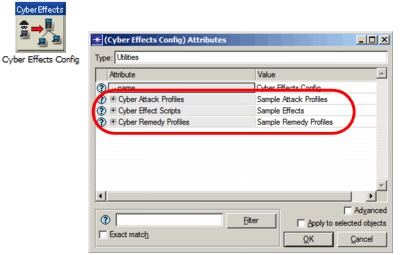
The Cyber Effects configuration node has three compound attributes that are used to define cyber effects:
- Cyber Attack Profiles
- Cyber Effect Scripts
- Cyber Remedy Profiles
Figure 122: Cyber Effects Configuration Object Attributes
Cyber Attack Profiles
This compound attribute contains the following sub-attributes:
Profile Name. User-defined name by which this profile will be known. This name must be unique in the scenario.
Phases. This compound attribute defines the phases of this attack, using the following sub-attributes.
- Phase Label. User-defined name that will be used to identify this phase. This name must be unique within the profile.
- Minimum Delivery Delay (seconds). How long after the start of the attack this phase will be executed. The actual start time might be later if this phase must wait for a previous phase to complete.
- Effects Script Payload. Name of the script to be delivered during this phase. This script must be defined by the Cyber Effect Scripts attribute and have a Type of “Attack”.
- Execution Condition. A condition that controls whether this phase of the profile will be executed. Execution can be “Always Execute” or conditional based on the status of another phase in this profile (as defined by the following sub-attributes). If the condition is not met, this phase is skipped.
- Other Phase to Evaluate. The label of another phase in this profile whose status determines whether this phase will be executed.
- Execution Condition. The status of the other phase that is required for this phase to be executed:
- Always Execute—Execute this phase regardless of the other phase.
- Execute If Other Phase Succeeded—Execute this phase only if the specified other phase was successful.
- Execute If Other Phase Failed—Execute this phase only if the specified other phase was unsuccessful.
- Destinations. Targets for this phase (that is, nodes to which the specified script will be delivered).
- Selection Mode. Specifies how the destinations will be determined:
- Same as Previous Phase— Use the same destinations as the previous phase (not valid for first phase).
- All Nodes—Deliver the script to every cyber-enabled node in the network.
- Random Destination—Deliver the script to a single destination chosen at random from the cyber-enabled nodes in the network.
- Use Destination List—Deliver the script to the nodes specified in the Destinations List attribute.
- Destinations List. Specifies an explicit list of nodes to receive the specified script, one node per row. Each row needs a value for only one of these two sub-attributes:
- IP Address. Address of the target node. If no IP address is specified, Node Name is used.
- Node Name. Name of the target node. Valid only if no IP Address is specified. Only nodes that support cyber effects are available to be selected.
- Selection Mode. Specifies how the destinations will be determined:
- Success. Specifies what constitutes successful completion of this phase, either “If Script Is Sent” or “If Script Response Is Successful”.
Cyber Effect Scripts
This compound attribute defines the scripts that are passed to nodes to implement attacks and remedies. Each script defines actions that will be performed on the nodes. (For more details, see Scripts.)
This attribute contains the following sub-attributes:
Script Name. User-defined name that will be used to identify this script. This name must be unique among scripts in the scenario.
Script. This compound attribute specifies one or more effects to be included in this script. Effects are specified one per row; each row has the following attributes:
- Label. User-defined name that will be used to identify this instance of an effect. This name must be unique among effect labels in the script.
- Category. The functional area this effect applies to. Category is used to filter the effects displayed in the Effect attribute pull-down menu.
- Effect. The effect to use. The pull-down menu lists all effects available in the specified category. The following table describes the built-in effects that are available.
Table 34: Built-in Effects
| Effect | Category | Description |
|---|---|---|
| Infect Device | General | Attempts to mark a node as infected. Success depends on the Infection Probability attribute of the target node. Argument: • Infection Duration (seconds). How long the device should remain infected |
| Return Infect Confirmation | General | Returns a message to the attacking node if infection was successful. No arguments. |
| Generate Traffic to… | General | Generates traffic to other nodes. Arguments: • Traffic Destination. The IP address of one or more nodes to which traffic should be addressed • Traffic Parameters. Compound attribute containing: – Packet Size (bits) – Packet Interarrival Time (seconds) – Duration (seconds). The period during which packets should be generated (beginning at the time the effect is executed) |
| Scan for Infections | General | Scans for infection and attempts to clean any infection found. Arguments: • Scan Duration (seconds). How long the scan will take • Cleaning Probability. The likelihood of successfully cleaning an infection at the end of the scan duration (that is, marking the node as un-infected). 100% means infections are always cleaned. |
| Increase Forwarding Rate | IP | Increases the IP forwarding rate of a node. Argument: • Increase Percentage. The percentage by which to increase the forwarding rate |
| Decrease Forwarding Rate | IP | Decreases the IP forwarding rate of a node. Argument: • Decrease Percentage. The percentage by which to decrease the forwarding rate |
- Arguments. This compound attribute specifies values for the arguments of the specified effect. The arguments (sub-attributes) for each effect are described in Table 34.
- Execution Condition. This compound attribute specifies a condition that controls whether this effect will be executed. The condition can be “Always Execute” or based on the status of another effect in the script (as defined by the following sub-attributes). If the condition is not met, this effect is skipped.
- Other Effect. The label of another effect in this script whose status determines whether this effect will be executed.
- Execution Condition. The status of the other effect that is required for this effect to be executed:
- Always Execute—Execute this effect regardless of the other effect.
- Execute If Other Effect Succeeded—Execute this effect only if the specified other effect was successful.
- Execute If Other Effect Failed—Execute this effect only if the specified other effect was unsuccessful.
Type. The type of profile this script is intended for: Attack or Remedy. In a profile, only scripts of the same type can be selected for a phase.
Cyber Remedy Profiles
The Cyber Remedy Profiles attribute has the same set of sub-attributes used by attack profiles. See Cyber Attack Profiles for details (substituting “remedy” for “attack” in the descriptions).