Using Device Creator to Create a Layer-3 Switch
Layer-3 switches are typically switches that have an RSM card, which enables the switch to do routing as well as switching. In Riverbed Modeler, you can model these nodes by creating Layer-3 switches with the Device Creator, as described in Procedure 114. The nodes created in this way have all of the attributes that are available on switches and on routers. No special configuration is required: routing parameters are configured as they would be on router nodes and switching parameters are configured as they would be on switches.
Procedure 114: Creating a Layer-3 Switch Using the Device Creator
-
Start Device Creator (Topology > Device Creator).
-
Click on the Switch icon in the Select Device Category dialog box.
-
Choose the type of switch to create in the Select a Switch Type dialog box.
-
Set the Include Routing Module (RSM) attribute to Yes in the Create a
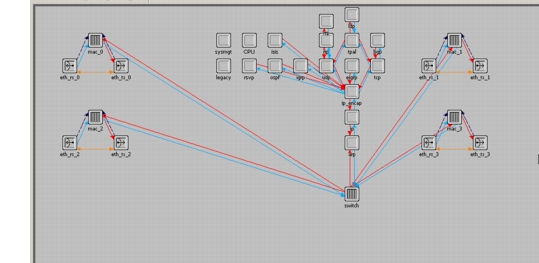
<switch_type>Switch dialog box. Configure the remaining switch parameters as desired then click Execute.Result: The new switch, with an architecture similar to the one shown in Figure 633, appears in the specified object palette.
Figure 633: Architecture of a Layer-3 Switch
End of Procedure 114