Configuring a Layer-3 Switch
Use the following procedure to configure a Layer-3 switch.
Procedure 113: Configuring a Layer-3 Switch
-
Identify a Layer-3 switch for the VLAN.
-
From the VLANs object palette, select a Layer-3 switch, such as the “ethernet16_switch_with_layer3” and add it to your network diagram.
-
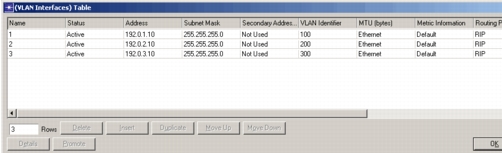
Open the Attributes dialog box of the Layer-3 switch. Expand the attributes IP > IP Routing Parameters > VLAN Interfaces > Edit…
Figure 631: VLAN Interfaces Table
-
To add a new VLAN, add a row to the table.
-
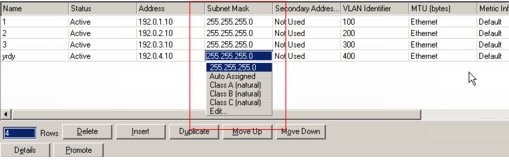
Set the Name, as the number or name assigned to the VLAN. Set Address and Subnet Mask with the address parameters of the VLAN. The subnet mask can be auto-assigned, explicitly specified, or identified as the default for a particular address class.
Figure 632: Subnet Mask Entry
-
Specify the VLAN Identifier.
-
Configure any additional parameters desired for the switch including
- MTU (bytes)
- Metric Information
- Routing Protocol(s)
- Compression
- Routing Filter
- Policy Routing
- Routing Instance
-
Click OK, when you are finished editing the VLAN interfaces, to exit the attribute configuration dialog box.
End of Procedure 113