VLAN Menu Operations
The Protocols > VLAN menu supports VLAN models.
Figure 628: VLAN Menu Operations
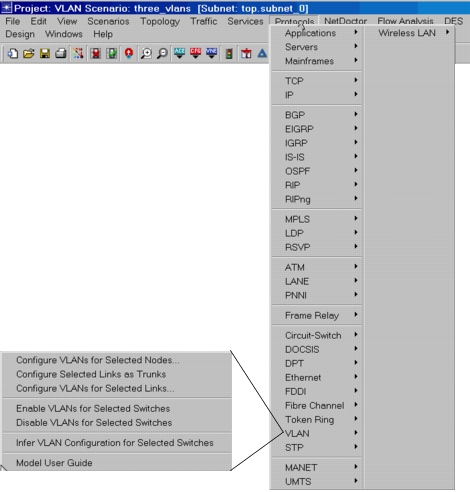
The following operations simplify the VLAN configuration process:
Table 252: VLAN Menu Operations
| Menu Item | Description |
|---|---|
| Configure VLANs for Selected Nodes | If you click this command while one or more switches are selected, you are prompted for a VLAN ID, and the switch or switches are configured to support a VLAN of that ID. As a result, the VLAN Parameters attribute for the selected nodes will have the following sub-attributes set: - Scheme set to Port-Based VLAN (if it was not already set). - Supported VLANs will have one 802.1Q VLAN of the specified ID defined, with default sub-attributes. You can repeat this command, specifying different VLANs each time. As a result individual switches can support multiple VLANs. Don’t forget that individual ports within the new VLAN-aware switches must still be configured using the Switch Port Configuration attribute. |
| Configure Selected Links as Trunks | If you click this command while one or more links are selected, they will be configured as trunk links. These links are expected to be the links between VLAN-aware nodes or the link connected to the Layer-3 switch. |
| Configure VLANs for Selected Links | If you click this command while one or more links are selected, you are prompted for a VLAN ID, and the ports of the selected links are configured to support the specified VLAN on the VLAN-aware bridge-switch nodes. |
| Enable VLANs for Selected Switches | Sets the switch(es) to be VLAN-aware. |
| Disable VLANs for Selected Switches | Sets the switch(es) to be VLAN-unaware. |
| Infer VLAN Configuration for Selected Switches | Automatically infers the VLAN configuration from the router interface that is connected to the port of the selected switch. The switch is configured to support the given VLAN and the port is configured to be a member of the VLAN. For example, if SwitchA is connected to RouterB, and RouterB’s interface is mapped to VLAN100, then the connected port on SwitchA becomes a member of VLAN100. SwitchA starts supporting VLAN100, if it was not already doing so. If the physical router interface has multiple subinterfaces, each of them mapped to a different VLAN, all of the VLANs will be inferred for the switch that is connected to that physical router interface. Note: You must first select the switch(es) in the project editor before you can use this feature. The VLANs are inferred only from router nodes. |