Model Attributes: VLAN
Every bridge or switch node model provides support for configuring VLANs:
Figure 625: Attribute Dialog Box for a Switch
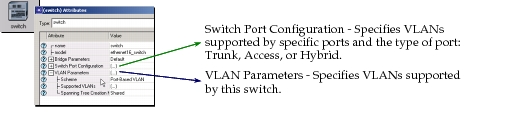
VLAN configuration is supported by the VLAN Parameters attribute and the Switch Port Configuration attribute. Each node that you want to be VLAN-aware must be configured as such by setting the VLAN Parameters > Scheme attribute to “Port-Based VLAN.” This can be done individually, as described below, or by selecting all the nodes you want made VLAN-aware, opening the Protocols menu, and choosing VLAN > Configure VLANs for Selected Nodes.