Configuring Routing Policies
You can apply route maps on a router to model routing policies at the router. A two-step process is used to implement routing policies in the network model.
- Define the route maps used by the router.
- Apply the route map to the appropriate neighbors.
For instructions about how to define a route map, see “IP” on page 1. Once defined, route maps can be applied as routing policies to routes received from—or going to—certain neighbors.
Procedure 21: Applying a Route Map to a Neighbor’s Routes
-
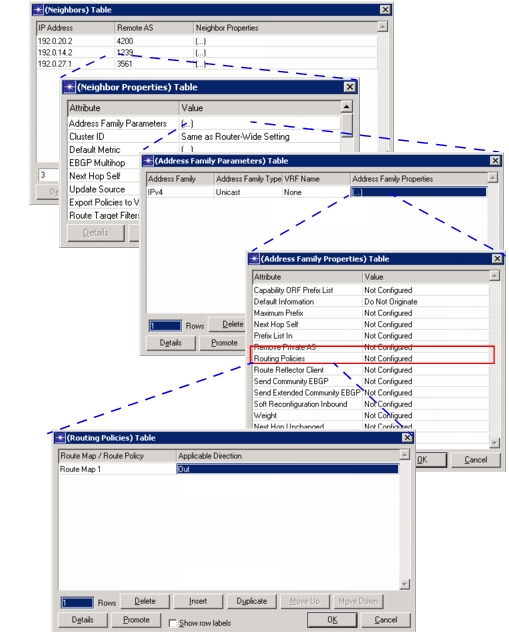
Choose the IP Routing Protocols > BGP Parameters > Neighbors > Neighbor Properties > Address Family Parameters > Address Family Properties attribute.
-
Edit the Routing Policies attribute and add a row to the Routing Policies table.
If you configure multiple route maps in the same direction, pay attention to the ordering of the route maps in the table. Routes are checked against route maps in the table in the order that they appear until a match is found. Route maps appearing further down the list are not considered, regardless of the action defined in the first matching route map.
-
Select the Route Map/Route Policy that you want to apply from the Route Map/Route Policy pull-down menu. If the route map or policy that you want is not listed, use Procedure 38 on page 22 to define the route map on this router.
-
Select one of the following values from the Applicable Direction pull-down menu:
- In—to apply the route map to routes received from this neighbor
- Out—to apply the route map to routes sent to this neighbor
Figure 117: Applying a Route Map
End of Procedure 21