Configuring Neighbors
To configure two routers as neighbors, only one router needs to configure the other as its neighbor.
Procedure 19: Configuring a Neighbor of a BGP Router
-
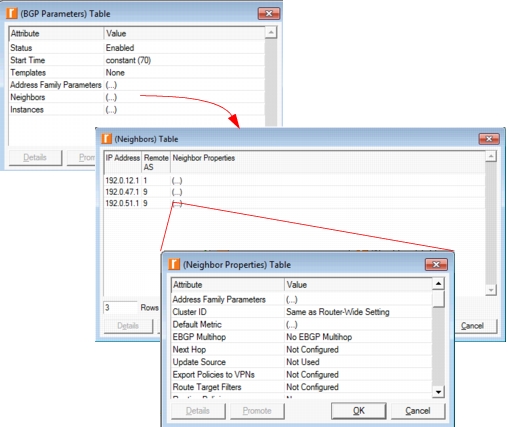
Edit the IP Routing Protocols > BGP Parameters > Neighbors attribute and add a row to the Neighbors table.
-
Enter the IP address of one of the neighbor’s interfaces in the IP address field. For IBGP neighbors, use the loopback interface.
-
Enter the neighbor’s remote AS.
This step is optional if the neighbor is not part of a confederation.
-
Edit the remaining attributes in the Neighbor Properties table as needed. Configuration of the Routing Policies attribute is described in Configuring Routing Policies.
Figure 113: Configuring a BGP Neighbor on a Router
End of Procedure 19