Configuring BGP Peers
Using BGP peering, you can reduce the processing power required for advertising BGP routes in the network. Rather than redistributing routes into another IGP, you can create a peering relationship between different autonomous systems with external BGP (EBGP) and within an autonomous system using internal BGP (IBGP). The following menu options are available to configure peering.
- Protocols > BGP > Configure IBGP Peers...
- Protocols > BGP > Configure EBGP Peers...
Configure IBGP Peers
This menu option launches a dialog box, shown below, in which you can configure all or selected routers as IBGP peers. This operation uses the IP addresses of the loopback interface on each router. If the IP addresses are not already set, this process sets them.
Figure 114: Configure IBGP Peers
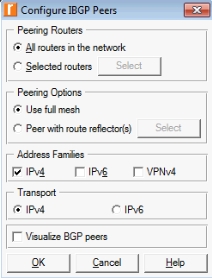
Table 28: Configure IBGP Peers
| Option | Description |
|---|---|
| Peering Routers | Specify whether all or selected routers will participate in peering operations. The Select button becomes active after you choose the “Selected routers” radio button. |
| Peering Options | Specify full mesh (default) or peering with selected route reflectors only. The Select button becomes active after choose the “Peer with route reflectors” radio button. |
| Address Families | Specify the address families that will be included in the BGP advertisements. |
| Transport | Specify the transport over which BGP advertisements will be sent. |
| Visualize BGP Peers | When this checkbox is selected, BGP peering visualization is enabled in the Project Editor upon completion of this operation. |
Configure EBGP Peers
This menu option launches a dialog box, shown below, in which you can configure EBGP peering in your network model. This operation uses the IP addresses of the loopback interface on each router. If the IP addresses are not already set, the process sets them.
Figure 115: Configure EBGP Peers
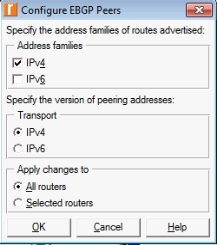
Table 29: Configure EBGP Peers
| Option | Description |
|---|---|
| Address families | Specify the address families that will be included in the EBGP route advertisements. |
| Transport | Specify the transport over which EBGP route advertisements will be sent. |
| Apply changes to | Specify whether all or selected routers will participate in EBGP peering. If you choose “Selected routers”, a minimum of two routers in different autonomous systems must be selected in the Project Editor prior to running this operation. |