手动编辑 Profile
要手动编辑 profile,请执行以下步骤:
过程 219:手动编辑 Profile
-
在 Profile Editor 中打开要编辑的 profile:
- 编辑 profile 属性:在 Edit Attributes 对话框中,点击该属性的 Value 字段;然后从下拉菜单中选择 Edit。
- 在 profile 库中创建并编辑新 profile:在 Profile Library Editor 中选择 Edit > Add Profile。这会在 Profile Editor 中打开新创建的 profile。
-
如有需要,在 Profile Name 字段中指定 profile 名称。
-
在 X Unit 和 Y Unit 字段中输入 x 轴和 y 轴的标签。仅当你从 Profile Library Editor 窗口定义 profile 时才需要此步骤。如果你编辑的是已有属性(例如 “traffic intensity (packets/sec)”),这些标签已经定义好。
-
(可选)为 x 轴指定统一间隔。Uniform X Intervals 复选框和 X Step 字段允许你为 profile 指定统一的时间间隔。
-
(可选)选中 Use start time 复选框并为 profile 数据指定起始时间。profile 起始时间与网络起始时间共同控制仿真中何时应用 profile 数据。如果 profile 没有起始时间,则默认从网络起始时间开始。
-
输入 x-y 值。为此,点击表格中第一个空行;然后在每个字段中输入 x 值(左侧)和 y 值(右侧)。右侧的图形会自动更新以反映你输入的值对。
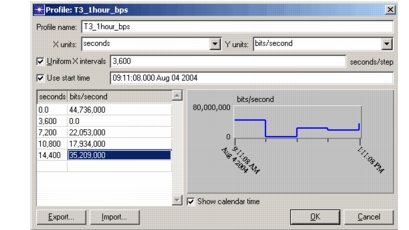
如果你指定了统一时间步长(即 Uniform X Intervals 复选框已启用),x 值(按定义即
last_x_value+x_interval_size)会自动指定。要指定不是时间步长倍数的值,请禁用 Uniform X Intervals 复选框。 -
点击 OK 关闭 Profile 对话框。