Ovis_Viewmode_Compass_Set()
Note: The Compass view mode is not supported in 3D Network Visualizer 3.1.0 and later. Calls to this function set the follow view mode, with the offset built from radius, azimuth, and elevation and orientation looking straight at or away from the entity.
Abstract
Sets 3D Network Visualizer to the Compass view mode.
Syntax
Ovis_Viewmode_Compass_Set (entity, radius, azimuth, elevation)
| Argument | Type | Description |
|---|---|---|
entity |
OvisT_Entity * |
Ovis entity |
radius |
double |
Distance of viewpoint from entity, in meters |
azimuth |
double |
Azimuth angle in X-Y entity plane, in degrees |
elevation |
double |
Elevation angle in X-Z entity plane, in degrees |
Return Type
OvisT_Compcode
OvisC_Compcode_Success if the operation could be performed; OvisC_Compcode_Failure otherwise.
Header
ovis_entity.h
Details
This function modifies the current view mode in 3D Network Visualizer to a compass mode attached to the specified entity. The viewpoint (VP) is located at <azimuth,elevation> on a sphere of specified radius. azimuth specifies the angle along the equator in the X-Y plane of the attached entity; elevation specifies the angle along the sphere in the X-Z plane of the attached entity.
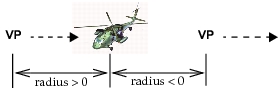
A positive radius will have the viewpoint looking toward the entity, while a negative radius will have the viewpoint looking away from the entity, as shown in Figure 12.
Figure 12: Compass Mode Viewpoint
Example
OvisT_Entity    * entity;

/* entity created at some point */

/* Looking straight at the entity from 20 meters */
Ovis_Viewmode_Compass_Set (entity, 20, 0, 0);
Errors
- Entity is NIL.
Reference
- Use other
Ovis_Viewmode_xxx_Setfunctions to change the view to different modes.