Ovis_3D_Area_Texture_Set()
Abstract
Specifies a texture to be applied to a 3D area.
Syntax
Ovis_3D_Area_Texture_Set (area_dec_ptr, texture_dir, texture_file, tile_count)
| Argument | Type | Description |
|---|---|---|
area_dec_ptr |
OvisT_3D_Area * |
Area of interest |
texture_dir |
const char * |
Directory path for the texture file |
texture_file |
const char * |
Name (including extension) of the texture file |
tile_count |
unsigned int |
Tiling division to be used (see Details) |
Return Type
OvisT_Compcode
OvisC_Compcode_Success if the texture is set; OvisC_Compcode_Failure otherwise.
Header
ovis_decoration.h
Details
A texture is a graphical file that is mapped into a 3D Area. The file can be in any of the following graphics formats:
- JPEG (.jpg)
- Microsoft Windows bitmap (.bmp)
- PNG (.png)
- Silicon Graphics bitmap (.rgb)
- TIFF (.tif)
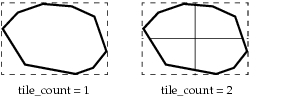
The texture file is mapped to the defined area in an n x n pattern of tiled images, where n is specified by tile_count. Thus, if tile_count is 1, one copy of the texture is mapped to the entire area. If tile_count is 2, four texture copies are mapped to the area in a 2 x 2 grid (as shown in Figure 9), and so on.
Figure 9: Example of Texture Tiling for 3D Areas
A texture overrides any other options specified for the area, such as a fill pattern or transparency.
Note: Applying a texture to an area is an expensive operation.
Example
OvisT_3D_Area      * area;
OvisT_Compcode       status;

/* … area created at some point */

status = Ovis_3D_Area_Texture_Set (area, "c:\textures", "my_texture.tif", 2);
Errors
- Decoration is NIL.
- Tile count should be greater than 0.
- Decoration is not a 3D area.
Reference
- Use the function
Ovis_3D_Area_Texture_Get()to get information about the texture applied to a 3D area.