Ovis_Decoration_2D_Circle_Create()
Abstract
Creates the 2D circle.
Syntax
Ovis_Decoration_2D_Circle_Create (center, x_scale, y_scale, color, filled, layer_ptr, destroy_proc, user_state_ptr)
| Argument | Type | Description |
|---|---|---|
center |
OvisT_2D_Position |
Center of circle |
x_scale |
double |
X scale of the circle |
y_scale |
double |
Y scale of the circle |
color |
PrgT_Color |
Color of the circle |
filled |
OvisT_Boolean |
Indicates fill |
layer_ptr |
OvisT_Layer * |
Ovis layer |
destroy_proc |
OvisT_Decoration_State_Destroy_Proc |
Destroys the data associated with the object and deallocates its memory |
user_state_ptr |
void * |
Optional user-provided state of the decoration |
Return Type
OvisT_2D_Circle *
The 2D circle
Header
ovis_decoration.h
Details
This function creates an Ovis 2D circle. It specifies the attributes of the circle. The circle has an initial transparency of 0, a solid pattern (all bits enabled if the circle is filled), and is not flashing.
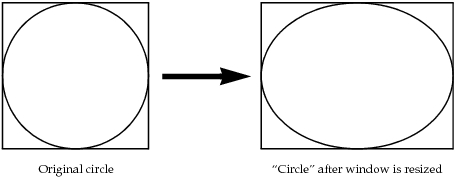
The x_scale and y_scale factors are defined in terms of the window width and height. A value of 1.0 for a circle centered at 0,0 means that the circle “diameter” will be equal to the window width or height. Note that a “circle” with equal x_scale and y_scale factors will look like a circle only if the 3D rendering window is an actual square (see Figure 11).
Figure 11: Effect of Window Dimensions on the Appearance of a Circle
Example
OvisT_2D_Position     pos;
OvisT_2D_Circle      * circle;
PrgT_Color     color = prg_color_from_string ("red");

pos.x = pos.y = 0;  /* middle of the screen */
circle = Ovis_Decoration_2D_Circle_Create (pos, 5, 5, color, OvisC_True, OPC_NIL,
	OPC_NIL, OPC_NIL);
Errors
- Invalid 2D position
<x,y>. 2D position values must be between –128 and 127. - Invalid X-scale value (
<value>). Scale value must be positive. - Invalid Y-scale value (
<value>). Scale value must be positive.
Reference
- Use the function
Ovis_2D_Polygon_Center_Set()to modify the center of the circle - Use the function
Ovis_Decoration_Color_Set()to modify the color of the circle. - Use the function
Ovis_Decoration_Transparency_Set()to modify the transparency of the circle. - Use the function
Ovis_Decoration_Flashing_Set()to modify the flashing status. - Use the function
Ovis_Shape_Pattern_Set()to modify the pattern used in the circle rendered area. - Use the function
Ovis_Polygon_Fill_Set()to modify the fill (disk) or unfill (circle) status. - Use the function
Ovis_2D_Polygon_Scale_Set()to modify the radius for circles or ellipses. - Use the function
Ovis_2D_Polygon_Rotation_Set()to modify the rotation around a Z-axis perpendicular to the monitor.