Ovis_Viewmode_Compass_Set()
注意: Compass 视图模式在 3D Network Visualizer 3.1.0 及更高版本中不受支持。对该函数的调用会设置 Follow 视图模式,其中 offset 由 radius、azimuth 和 elevation 构建,且 orientation 正对实体或背离实体。
摘要
将 3D Network Visualizer 设置为 Compass(罗盘)视图模式。
语法
Ovis_Viewmode_Compass_Set (entity, radius, azimuth, elevation)
| 参数 | 类型 | 说明 |
|---|---|---|
entity |
OvisT_Entity * |
Ovis 实体 |
radius |
double |
视点与实体之间的距离,单位为米 |
azimuth |
double |
X-Y 实体平面内的方位角,单位为度 |
elevation |
double |
X-Z 实体平面内的仰角,单位为度 |
返回类型
OvisT_Compcode
若操作可执行则返回 OvisC_Compcode_Success,否则返回 OvisC_Compcode_Failure。
头文件
ovis_entity.h
详情
该函数将 3D Network Visualizer 的当前视图模式改为附加到指定实体的罗盘模式。视点(VP)位于以指定 radius 为半径的球面上的 <azimuth,elevation> 处。azimuth 指定沿附加实体 X-Y 平面赤道的角度;elevation 指定沿附加实体 X-Z 平面的球面角度。
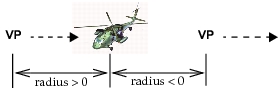
radius 为正时视点朝向实体观察,为负时视点背离实体观察,如图 12所示。
图 12:罗盘模式视点
示例
OvisT_Entity    * entity;

/* entity created at some point */

/* Looking straight at the entity from 20 meters */
Ovis_Viewmode_Compass_Set (entity, 20, 0, 0);
错误
- 实体为 NIL。
参考
- 使用其他
Ovis_Viewmode_xxx_Set函数可将视图切换到不同模式。