Ovis Mapping Library
Riverbed analysis software does not provide any hard-coded conversion between the network topology found in a scenario and the 3D entities and decorations shown in 3D Network Visualizer. Instead, this is delegated to an Ovis Mapping Library. Riverbed provides a standard mapping library, but Modeler and OPNET Development Kit users can develop their own custom libraries.
Infrastructure
The mapping library is composed of a set of callbacks invoked by 3D Network Visualizer during the visualization process. You can develop your own custom code that controls how Ovis entities or associated decorations are created, updated, and destroyed.
Figure 4 shows the callbacks and the order in which they occur. Each callback is described in Callback Definitions.
Figure 4: Ovis Callbacks
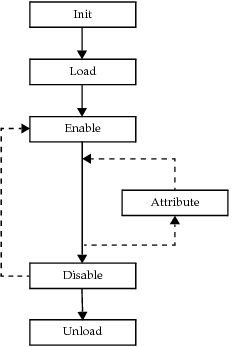
The mapping library has two components:
- A network-level portion that is used directly by the Ovis package
- A node-level portion that is associated with node models and optionally used by the network-level portion
The two portions do not have to belong to the same library. However, you can have a single library used both by some node models and a network model. This allows a model designer to provide an appropriate 3D mapping for a node model, which will then be used by a network-level mapping library potentially written by someone else. Riverbed analysis software does not support the discovery of RTI objects in the GUI.
DES vs. GUI Libraries
DES and GUI have different sets of runtime libraries, in particular the simulation kernel and the ETS library. For simplicity of linking and loading the mapping library, Riverbed generates different versions to be used with DES (with the appropriate dev32, opt32, etc., kernel type suffixes in the library name, linked against the corresponding simulation kernel libraries) and with the GUI (with “gui32” suffixes, linked against the ETS library).
The information most likely needed for a mapping library are the topology of the network, the attributes of the sites, and potentially the “P-state” data that can be associated with sites in the GUI. DES and GUI have different but related APIs to access some of that information: op_topo and op_ima for the DES, and Ets_Topo, Ets_Obj, and Ets_Client_State/Ets_State for the GUI.
Note: Riverbed analysis software does not support “P-state” information in DES. To enable the user to compile the same mapping code for DES and GUI use, Riverbed provides some Ets_Topo and Ets_Obj function names for DES compilation. These functions map to the appropriate DES internal APIs, either directly with #define or indirectly with appropriate thin layer.
Compilation of the object files will include an OPD_DES or OPD_GUI symbol so that user code can use #if define blocks to ensure that only certain sections of the appropriate library are compiled. This allows the full use of the KPs or ETS APIs in more advanced mapping libraries.
Some of the callbacks described in the following are only applicable for one library, in which case the code will be automatically wrapped in #if defined (OPD_DES) or (OPD_GUI).
Some ETS types (EtsT_Obj_Handle, EtsT_Network_Handle, etc.) are defined in the DES-context. The actual representation might not be the same as what is used in the GUI, but this eliminates the need to duplicate callbacks for DES and GUI use. The DES space will have APIs to convert these ETS types into the corresponding DES types.
The following APIs are usable in the traditional contexts of both the Project Editor (GUI) and DES. You can use these APIs if you are writing code that, for simplicity, needs to work in both environments:
- Ets_Api_Init()
- Ets_Model_Current_Get()
- Ets_Obj_Attr_Exists()
- Ets_Obj_Attr_Get()
- Ets_Obj_Attr_Set()
- Ets_Obj_Equal()
- Ets_Obj_Invalid()
- Ets_Obj_Invalid_Get()
- Ets_Obj_Type_Get()
- Ets_Topo_Assoc_Count_Get()
- Ets_Topo_Assoc_Get()
- Ets_Topo_Child_Count_Get()
- Ets_Topo_Child_Get()
- Ets_Topo_Connect_Count_Get()
- Ets_Topo_Connect_Get()
- Ets_Topo_Object_Count_Get()
- Ets_Topo_Object_Get()
- Ets_Topo_Parent_Get()
- Ets_Topo_Top_Get()
For a complete list of the ETS/DES relationships, see the file <reldir>\sys\include\p_ets.h.
3D Network Visualizer Mapping Library State
When 3D Network Visualizer is enabled, the GUI or Simulation Kernel loads the mapping library specified by the preference 3dnv.mapping_library. First the “init” mapping library callback is called; then the “load” callback is called to prepare the mapping library internal state for the visualization of a particular network model. The “load” callback takes an arbitrary string as an argument, and can be used to pass requested visualization options or some auxiliary information about the network to the mapping library.
A matching “unload” callback is invoked to free the state information when the network model is unloaded (GUI) or the simulation terminates (DES), or if the mapping library preference is modified, in which case the new library’s “load” callback is invoked.