Server Characterization Editor Toolbar Buttons
The Server Characterization Editor toolbar buttons provide access to frequently-used operations, all of which are available through the menu bar. In the following table, the numbers below the buttons correspond to the command descriptions. To configure the toolbar buttons, see "Configuring the Toolbar" on page 7.
Table 1: Toolbar Buttons
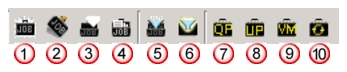
| Button | Command | Description |
|---|---|---|
| 1 | New Job | Creates a new job (same as Jobs > New Job…) |
| 2 | Delete Job | Removes the current job (same as Jobs > Remove Job) |
| 3 | Clear Job | Removes all Process/Thread information from the current job (same as Jobs > Clear Job) |
| 4 | Edit Job Properties | Opens the Properties window of the current job (same as Jobs > Job Properties) |
| 5 | Apply Filters | Applies the specified filters to the current job (same as Filters > Apply Filters) |
| 6 | Manage Filters | Opens the Filters dialog box of the current job (same as Filters > Manage Filters) |
| 7¹ | QuickPredict | Lets you predict the effect of scaling jobs (same as Simulation > Quick Predict) |
| 8¹ | Server Upgrade QuickPredict | Lets you predict the effects of upgrading certain server elements (same as Simulation > Server Upgrade QuickPredict) |
| 9¹ | Virtual Machine QuickPredict | Lets you predict the effects of moving a server to a virtual machine (same as Simulation > Virtual Machine Quick Predict) |
| 10 | SCE Simulation Wizard | Allows you to create and configure a standalone server model, run the simulation, and display the statistics (same as Simulation > Discrete Event Simulation) |
Note 1: Available in IT Guru Systems Planner only.