Configuring SDN
Running simulations in the SDN model requires that you have a controller (connected externally) and at least one switch configured. The following are the two basic steps to setting up your SDN model.
Configure SITL
To run a simulation in an SDN model, you must configure a gateway to the controller using System-in-the-Loop (SITL). The real controller will then communicate with the switches in your network model. You can use an SDN controller such as OpenDaylight to communicate with your model through SITL.
Note: To understand how to configure and use SITL, see "Configuring and Running a SITL Simulation" in the SITL User Guide.
Configure the SDN Switch
You must also ensure your SDN switches are correctly configured to communicate with the controller. To configure switches, set the following attributes:
- Controller IP address – For the switch to establish communication with the controller, it must know the controller's IP address. Configure a fixed IP address on the controller, and then configure the "Controller IP Address" on the switch.
- Controller TCP port – The switch and controller communicate over TCP. Set the "Controller TCP Port" attribute on the switch to "OpenFlow TCP Port" (default).
- Port to Controller – The switch will communicate with the controller from one of the switch ports. Ensure that the port you want to use is configured, connected, and available. On the switch, set the "Port to Controller" attribute to the port that will be used to send traffic to the controller.
- IP address – Configure the IP address of the switch. The real controller must be able to reach the switch using this IP address.
- Controller Connection Time – Configure the time when the switch will initiate its TCP connection with the controller. This attribute should be set to a time that is later than the default 0.0 seconds, if the network contains other routing/switching nodes besides SDN switches, like regular routers whose dynamic routing protocols will need time to converge. An SDN switch should try to connect with the controller only after all the regular router and switch nodes along the path, if any, complete their convergence.
Note: For details about switch attributes, see SDN Switch Attributes.
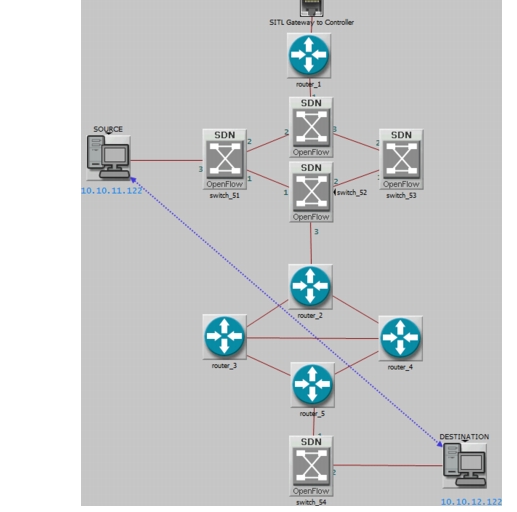
You can use SDN switches in a variety of scenarios. Several scenarios are included in the SDN example project, such as the scenario shown below, which has SDN switches co-existing in a network with routers running the OSPF protocol.
Figure 477: Network Model using SDN Switches with OSPF Routers
Configuring SDN Switches Using Template
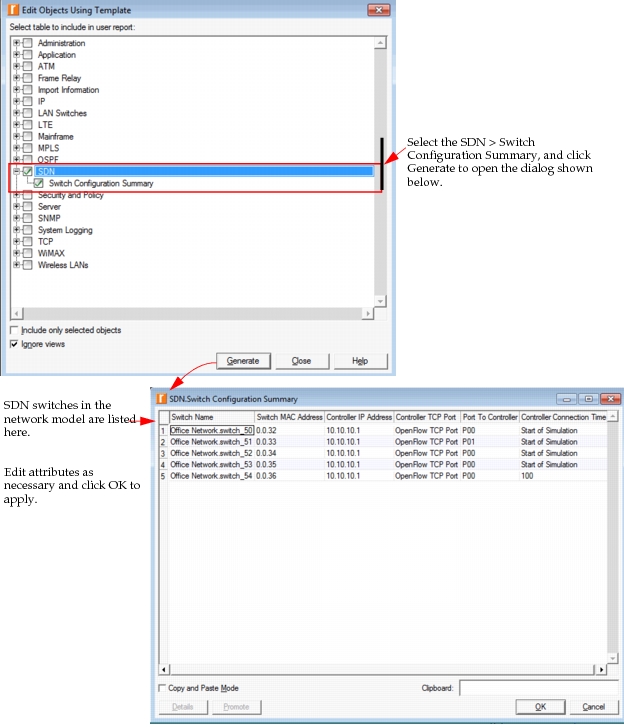
In additional to individual SDN switch configuration, you can use a template to edit multiple switches at once. Use Edit > Edit Objects Using Template. Select SDN, as shown below, and edit the attributes included in the pre-defined template "Switch Configuration Summary".
Figure 478: Configure Multiple SDN Switches Using a Template