Flow Table
Each flow table contains multiple flow entries (also referred to as flow table entries). The match fields and priority uniquely identify the flow table entry, as illustrated in the figure below. This section describes the supported features of flow table entries.
Note: A special kind of flow entry is the table-miss flow entry. It has a priority of 0 with all match fields omitted. For more information, see Table-Miss Flow Entry.
Figure 475: Example of Flow Table Entry
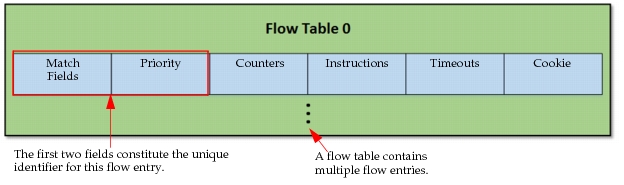
The fields in a flow table entry are described below.
-
Match Fields – Matched against the incoming packets. Match information for a packet consists of the ingress port and packet headers. If the packet has been forwarded from another flow table, actions applied during processing will also be included. See Supported Match Fields for more information.
-
Priority – Matching precedence of the flow entry
-
Counters – Tracked and maintained for each flow entry.
-
Instructions – The set of instructions is executed when a packet is matched. The instructions may modify the packet, the action set, or pipeline processing. The instruction set associated with a flow entry can only contain one instruction of each type. A switch may reject a flow entry if it cannot execute the instructions contained within.
The following instruction types are supported.
- Meter <meter_id> – Directs the packet to the specified meter (see Meter Table).
- Apply-Actions <actions> – Applies the specified action(s) immediately, without changing the action set (see Action Set). Multiple actions can be specified as an action list. This instruction is the only way multiple actions of the same type may be applied.
- Clear-Actions – Clears all actions from a packet’s action set immediately.
- Write-Actions – Merges the specified actions into the current action set. Since the packet’s action set may only have one action of a given type, this operation may overwrite an action of the same type already in the action set.
- Goto-Table <next-table-id> – Specifies the next table in the processing pipeline. The table-id must be greater than the current table. This instruction cannot be used in the last flow table.
-
Timeouts – Maximum amount of presence time or idle time before the switch expires the flow.
-
Cookie – Opaque data value chosen by the controller, which may be used to filter flow statistics, flow modification, or flow deletion.
Supported Match Fields
The following match fields are supported.
Table 193: Supported Match Fields
| Match Field | Prerequisite | Description |
|---|---|---|
| Ingress port | None | Numerical representation of the incoming port |
| Ethernet source address | None | Source MAC address |
| Ethernet destination address | None | Destination MAC address |
| Ethernet frame type | None | Ethernet type of the packet payload |
| VLAN ID | None | VLAN-ID from 802.1Q tag |
| Layer-2 priority | VLAN_VID!=NONE | Layer-2 priority from 802.1Q tag |
| IP DSCP | ETH_TYPE=0x0800 or ETH_TYPE=0x86dd | DiffServ Code Point. Part of the IPv4 ToS field or the IPv6 Traffic Class field. |
| IP ECN | ETH_TYPE=0x0800 or ETH_TYPE=0x86dd | ECN bits of the IP header. Part of the IPv4 ToS field or the IPv6 Traffic Class field. |
| IP protocol | ETH_TYPE=0x0800 or ETH_TYPE=0x86dd | Number specifying IPv4 or IPv6 protocol |
| IPv4 source address | ETH_TYPE=0x0800 | IPv4 source address. Can use subnet mask or arbitrary bitmask. |
| IPv4 destination address | ETH_TYPE=0x0800 | IPv4 destination address. Can use subnet mask or arbitrary bitmask. |
| IPv6 source address | ETH_TYPE=0x86dd | IPv6 source address. Can use subnet mask or arbitrary bitmask. |
| IPv6 destination address | ETH_TYPE=0x86dd | IPv6 destination address. Can use subnet mask or arbitrary bitmask. |
| TCP source port | IP_PROTO=6 | — |
| TCP destination port | IP_PROTO=6 | — |
| UDP source port | IP_PROTO=17 | — |
| UDP destination port | IP_PROTO=17 | — |
Action Set
As illustrated in Figure 474, each packet has an associated action set. By default, the action set is empty, so when a packet enters the pipeline, it has nothing in its action set. Actions are added to the action set (Write-Action instruction) or deleted from the action set (Clear-Action instruction) by matching flow entries. The packet carries the action set to subsequent flow tables, as directed. See Supported Actions for more information.
Action List
When an Apply-Actions instruction is used, the instruction includes an action list. Actions within an action list are executed in the order specified by the list, beginning with the first action listed. These actions are applied immediately. Note the following:
- If an output action is specified in the action list, a copy of the packet in its current state is forwarded to the target port.
- If the action list contains group actions, a copy of the packet is forwarded to the group table for processing.
- The execution of the action list does not modify the action set of the packet.
When all of the actions in the action list have been executed, the modified packet continues through the pipeline.
Note: Packet-out messages also include an action list.
Supported Actions
The following table contains the actions supported by the SDN model in the order in which they are executed.
Table 194: Supported Actions
| Action (in order of execution) | Description |
|---|---|
| Change-TTL | Modifies the value of the IPv4 TTL or IPv6 Hop Limit in the packet. |
| • Decrement IP TTL | Decrements the IPv4 TTL or IPv6 Hop Limit. If the TTL/Hop Limit becomes zero, the packet is dropped. |
| • Set IP TTL | Replaces the IPv4 TTL or IPv6 Hop Limit |
| Set-Field | Modifies the values of header fields in the packet. Supported Set-Fields are as follows: • Set VLAN ID • Set Layer-2 Priority • Set IP DSCP • Set IP ECN |
| Group | Processes the packet through a specified group. If specified, applies the actions of the relevant group bucket in the order specified by this table. Group chaining is supported (an action of a group bucket can direct the packet to another group). When the group instruction is specified, the output action is ignored. |
| Output | Forwards the packet to a specified port. |
| Drop | Packets whose action sets are empty or contain no group or output actions are dropped. This is not an explicit action but one which results from a lack of actions. |
Table-Miss Flow Entry
The table-miss flow entry specifies how to process packets that are unmatched by other flow entries in the flow table—send packets to the controller, drop packets, or direct packets to the next flow table, for example. The table-miss flow entry wildcards all match fields (see Figure 475) and has a priority of 0. Initially, each flow table has a default table-miss flow entry that drops the packets.
Flow Entry Removal
Flow entries may be removed from tables in one of the following ways.
-
Removed by the Controller– The controller can send DELETE or DELETE_STRICT flow table modification messages to actively modify the flow entries.
-
Removed by the Switch– The switch uses a flow expiry mechanism to remove flow entries based on the state and configuration of the flow entries. Each flow entry has two timeout settings:
idle_timeoutandhard_timeout. If either entry is not zero, the switch notes the arrival time of the flow entry.idle_timeout– Time (in seconds) after which a flow entry is removed if it has matched no packets.hard_timeout– Time (in seconds) after which a flow entry is removed regardless of whether it has matched packets.
When a flow entry is removed, the switch checks the SEND_FLOW_REM flag. If the flag is set, the switch sends a flow removed message to the controller.
Group Table
A group table allows a flow entry to point to a group to represent different forwarding methods. A group table entry comprises the following fields.
- group identifier – A group entry is identified by this 32-bit unsigned integer.
- group type – The group type determines group semantics (see Group Types).
- counters – Counters are updated when packets are processed by a group.
- action buckets – Each action bucket contains a set of actions and their parameters that are to be executed.
Group Types
Modeler supports the following group types.
- all – The all group is used for multicast or broadcast forwarding. An incoming packet is cloned for each action bucket of the group, and each bucket processes the packet. The group will not forward the packet back out the ingress port unless the group includes an output action to
IN_PORT. - indirect – This group type contains only one defined action bucket. By having only a single entry, multiple flow entries or groups can point to this group type for faster and more efficient convergence.
Meter Table
A meter table contains meter entries, which define per-flow meters. Per-flow meters allow you to implement basic QoS operations, such as rate-limiting, or to combine with per-port queues to implement more complex QoS strategies, such as Diffserv. Any flow entry can specify a meter in its instruction set (see Flow Table), and the meter measures and controls the aggregate rate of all the flow entries to which it is attached.
Each meter entry contains the following fields.
-
meter identifier – A meter entry is uniquely identified by this 32-bit unsigned integer.
-
meter bands – A list in which each meter band specifies the rate of the band and how to process the packet. At a given time, packets are processed by a single band, and for this, the meter chooses the band with the highest configured rate that is equal or lower than the current measured rate of the meter. Each meter band has the following fields.
- band type – Defines how packets are processed
- rate – Defines the lowest rate at which the band can apply. The meter selects the meter band based on the value of this field.
- counters – Counters are updated when packets are processed by a meter band.
- type-specific arguments – Optional arguments
-
counters – Counters are updated when packets are processed by a meter.
Meter Band Types
Modeler supports the following meter band types.
- drop – Drops the packet. This field can be used to define a rate limiter band.
- dscp remark – Increases the drop precedence level of the packet by updating the DSCP field in the IP header.