Importing Traffic Flows from SteelCentral NetProfiler
SteelCentral NetProfiler combines network flow data with packet-based performance metrics collected throughout the network. You can import the traffic flow data by choosing one of the following menu options:
- Traffic > Import Traffic Flows > From NetProfiler: IP Flows
- Traffic > Import Traffic Flows > From NetProfiler: Host Flows
Import IP Traffic Flows from NetProfiler
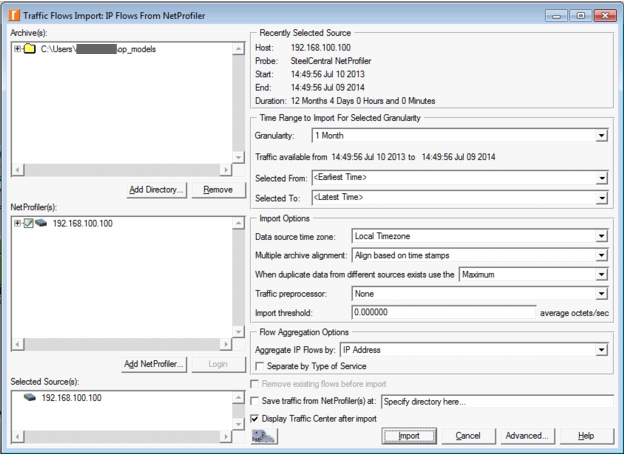
In the dialog box that appears (shown below), you will specify the NetProfiler from which you want to import, the time range and granularity, flow aggregation, and import and display options. Click "Import" when you are ready to import flows.
Figure 3: Import IP Traffic Flows from NetProfiler
Note: NetProfiler will export no more than 100,000 flows per selected unit of time granularity (e.g., daily, hourly, minute). For greater granularity of traffic data, select a smaller unit of time granularity. For example, an hour’s worth of per 5 minutes flow samples provide less accuracy than an hour’s worth of per minute flow samples.