Server Attributes
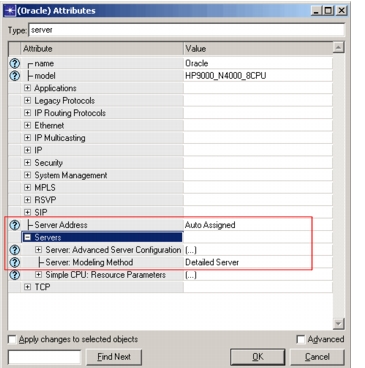
In addition to the Server Configuration attributes, a number of attributes are provided on the individual servers. These affect only the server on which they're specified, although in many cases they rely on information provided in the Server Configuration object.
Figure 502: Server Modeling Attributes on Server Nodes
-
Server: Modeling Method. Currently the detailed server models can be used for standalone server modeling or can be used for end-to-end application performance modeling using Custom Application or Transaction Analyzer. Other existing Riverbed application models continue to use the simple CPU model. And for those occasions when detailed modeling is not necessary, you can select which modeling method is right for a given server in your scenario.
- Simple CPU. This method uses a simple contention model to simulate server activity. The Simple CPU model is used to model the IP packet forwarding delays and application processing delays. Configuration specific to the simple CPU model is in the 'CPU Resource Parameters' and 'CPU Background Utilization' compound attributes (these attributes are not being described in this usage guide).
- Detailed Server. The detailed server modeling method uses the advanced modeling capabilities described in this document. A specialized license is required to run in Detailed Server mode. Note: In this mode, both the Simple CPU model and the detailed server models are active. The Simple CPU model continues to model IP packet forwarding delays and application processing delays (even custom application and Transaction Analyzer, unless the custom application and Transaction Analyzer configuration specifically are tied to the detailed server models).
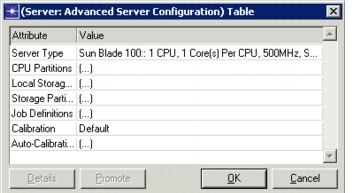
All the attributes specific to the detailed server model are housed by the Server: Advanced Server Configuration attribute. These attributes are used to describe the CPU and IO subsystems of the server, to configure the storage partitions defined on the server and to list the workloads (jobs) to be run on the server.
Figure 503: Advanced Server Configuration Table
-
Server Type. The name of a server type as described in the Server Definitions dialog box. It describes the characteristics of this, the 'target', server. The server name specified is used to obtain the information associated with this server type in the Server Definitions table.
-
CPU Partitions. Allows the CPUs of the server to be grouped into processor sets, called CPU Partitions.
- Each CPU Partition acts like an independent server, each CPU partition can run a different operating system and has its own paging system.
- Each CPU Partition maintains its own job queue.
- Workloads (jobs) are bound to CPU Partitions, which is to say that jobs run only on the CPUs which belong to that CPU Partition.
- A CPU can belong to multiple CPU Partitions, and these CPU Partition have an equal weight to use that CPU.
- A CPU is assigned the highest priority job among the ready job queues of all the CPU Partitions sharing that CPU.
- A default CPU Partition, identified by name 'Default' should always be configured. All unassigned CPUs are assigned to this CPU Partition. By default, all jobs are assigned to this partition. CPU Partition configuration involves specifying an unique name, the list of CPUs belonging to the CPU Partition, specifying the operating system to run on it and its paging system definition. Each of these attributes are described in more detail next.
Figure 504: CPU Partitions Table
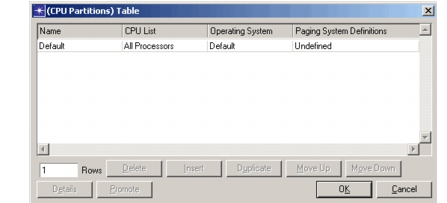
- Name. A value used to uniquely identify this CPU Partition for binding jobs to it and for statistic reporting.
- CPU List. The list of CPUs belonging to this CPU Partition, the CPUs are identified by their index starting with zero.
Figure 505: CPU List Table
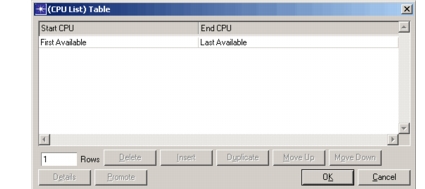
Each row in the CPU List Table specifies an index range. The list of CPU is formed by performing an union operation of all the index ranges.
- Operating System.An operating system description as given in the Server Configuration object. This describes the timeslice and the scheduling algorithm to be used for the CPUs belonging to this CPU Partition. Note: When a CPU is shared by multiple CPU Partitions, the operating systems configured on those CPU partitions should have the same timeslice.
- Paging System Definitions. Each CPU partition is associated its own paging system, definition includes the following:
Figure 506: Paging System Definitions Attribute
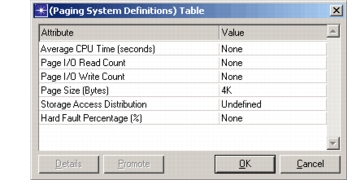
a) Average CPU Time (seconds). The amount of CPU time used by a single paging operation, whether hard (requiring an I/O) or soft (not requiring an I/O). b) Page I/O Read/Write Count. In the case of a hard fault, a paging operation requires I/O operations. These distributions determine the number of reads and writes required. c) Page Size (Bytes). Unlike standard I/O operations, paging operations are defined by the operating system, not the job. d) Storage Access Distribution. The paging system needs to know how paging operations will be distributed across the available storage partitions.
 *Storage Partition Name*. The name of the storage partition to receive the I/O operation.

 *Access Weight.* Each storage partition is assigned an access weight that determines which storage partition receives an I/O operation. Two storage partitions with equal weights receive an equal number of operations when averaged over a simulation.
e) Hard Fault Percentage (%). The job definitions determine how many page faults are generated by an application. This parameter determines how many of those are found in memory, and how many require an I/O operation
- Local Storage Subsystem. A description of the physical layout of the disks and disk interfaces connected to a system. This represents the server's direct attached storage (DAS) configuration.
Figure 507: Local Storage Subsystem
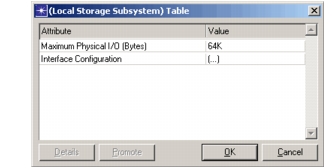
Maximum Physical I/O. When defined, this parameter causes large data transfers to be divided into several smaller transfers. In the case of RAID configured systems (except for RAID 1, more about RAID configuration shortly), the lower of this and the data stripe size determine the maximum size of data transfer.
Interface Configuration. As in a real server, an interface contains one or more interface channels to which are connected zero, one or more disk drives. They are specified in a similar fashion:
Figure 508: Interface Configuration Table
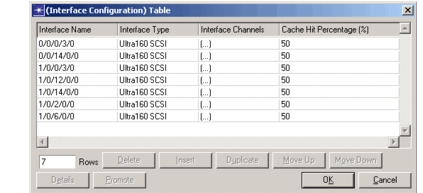
- Interface Name. A value used to uniquely identify this interface for statistic and reporting purposes.
- Interface Type. An interface description as given in the Server Configuration object. This describes the hardware characteristics of the interface.
- Cache Hit Percentage. The portion of all disk reads that are retrieved directly from the controller's onboard cache without requiring a disk access.
- Interface Channels. Each disk interface can have one or more interface channel. The Interface Channel Table has only one column: the 'Disk Configuration'. Each row of this table represents the disks attached to that interface channel which is index by the row number.
Figure 509: Interface Channels Table
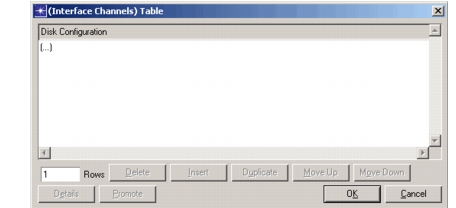
Disk Configuration. A description of the disk drives connected to this interface.
Figure 510: Disk Configuration Table
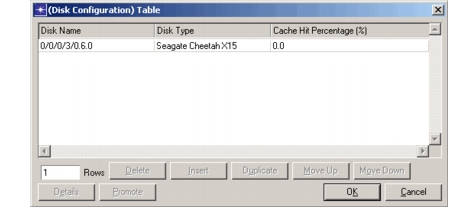
Disk Name. A user-defined value that identifies the drive for configuring Local (direct attached) storage partitions, as well as for statistic and reporting purposes.
Disk Type. A description of the drive's hardware characteristics, as defined in the Server Configuration object.
Cache Hit Percentage. A portion of all disk reads will be retrieved directly from the drive's onboard cache without requiring access to the physical drive. Unlike cache hits at the interface level, hits at the drive level still require a data transfer operation.
-
Storage Partition. Jobs (processes) do not read/write directly from/to disks, instead they read/write from/to storage partitions. For a every day example, your Windows machine may have one hard disk which is partitioned into two drives, C: and D:. When a file is to be saved you specify the drive (and the directory on that drive) in which you want save it. Further you may also have mapped drives which access data on a remote server. Similarly a Unix system normally has a number of partitions mounted, each partition could be a different disk or a different logical volume on the same disk, or may be NFS mounted. Storage partitions form one level of indirection, and facilitate use of different types to storage methods and devices.
Riverbed server models support three types of storage partitions:
- Local - storage partitions with direct attached storage
- Measured - storage partitions for which access times and throughputs are known but detailed disk/storage device information is not available
- Remote - storage partitions that access data from remote server's storage partitions
Figure 511: Storage Partitions Table
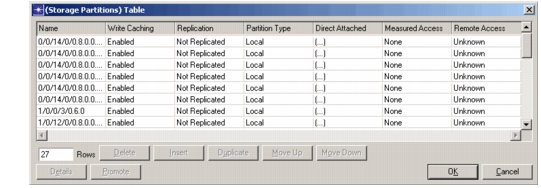
Name. A value used to uniquely identify this storage partition. Used in the job definitions and paging system definitions and for statistic reporting.
Partition Type. The three types of storage partitions mentioned above. When the partition type is set to "Local" the "Direct Attached" attribute provides relevant information, when set to "Measured" attribute "Measured Access" is used and when set to "Remote" attribute "Remote Access" is used.
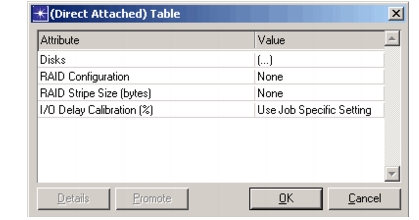
Direct Attached. Specifies the information required for local storage partitions. The direct attached storage uses to the disks configured in the "Local Storage Subsystem" compound attribute. A local storage partition can span multiple disks and a disk can belong to multiple storage partitions. Further a local storage partition can have a RAID configuration.
Figure 512: Direct Attached Table
-
Disks. Allows you to specify the list of disks that belong to this storage partition. These disks need to be previously configured in the "Local Storage Subsystem" attribute.
-
RAID Configuration. This attribute specifies the RAID parameters. Storage partitions support several common RAID standards, including:
RAID 0 - Data Striping. Data is distributed over multiple drives in fixed size "stripes". This allows data transfers to take place on one drive while a second or third drive positions itself to be ready for the next data transfer. This can greatly improve disk access performance. Unfortunately, the loss of a single drive in the RAID group leaves holes in the data, effectively rendering all information lost. At least two drives are required for data striping.
RAID 1 - Data Mirroring. Designed primarily for improved fault tolerance , mirroring writes separate copies of the same data to two or more drives. The loss of one of the drives does not cause data loss. While there may be a slight improvement in read performance caused by accessing the first available drive, write performance is degraded because multiple physical writes are needed for a single logical write. Mirroring requires a minimum of two drives, with additional drives added in pairs.
RAID 0+1 - Striping and Mirroring. To provide the performance of RAID 0 with the fault tolerance of RAID 1, the two are often used together. Striping is effectively done on two drives simultaneously, effecting a mirror. This is typically used on lower-end servers, as it makes inefficient use of available drive space. At least four drives are required, with additional drives added in pairs.
RAID 5 - Parity. To use data storage resources more efficiently, RAID 5 uses a distributed parity scheme to maintain fault tolerance. While write operations require two physical writes similar to the mirroring scheme, RAID 5 combines data from several drives into a single parity block, which is then distributed across the drive groups. The result is that the loss of any one drive in the group does not result in the loss of all data. Distributing the parity evenly across all drives prevents any one drive from becoming a bottleneck. Combining data from multiple drives into a single parity stripe means the storage overhead of the parity information decreases as the number of drives increases. At least three drives are required for RAID 5.
-
RAID Stripe Size. Determines the size of a "stripe" when RAID 0 (striping), RAID 0+1 (striping and mirroring) and RAID 5 (distributed parity) is configured. Data transfers of size greater than the stripe size are broken up into multiple transfers of this or smaller size.
-
RAID Implementation. RAID implementation can either be a hardware or a software implementation. Currently only hardware implementation is modeled.
-
RAID Access Job. Will be used when software implementation modeling is supported. Currently this attribute value is not read.
Measured Access. There are times when the exact storage partition being accessed by a job cannot be identified from the server performance data obtained from a data collector agent. However, what can be obtained is information about the access times and the throughput of the interface over which data was accessed. In such situations the measured storage partition could be used.
Figure 513: Measured Access Table
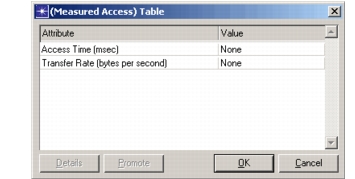
- Access Time. A distribution describing the amount of time spent in accessing the data. This information can be obtained from the response times reported by the data collector.
- Transfer Rate. An integer that specifies the throughput of the interface over which data is being accessed.
Remote Access. Operating systems and network protocol implementations have made possible seamless access to data on remote servers. Storage partitions of type "Remote" allow jobs to accessing remote data. This allows to model effect of remote storage access on job completion times, and also effects of the traffic load on the networks that carry this traffic.
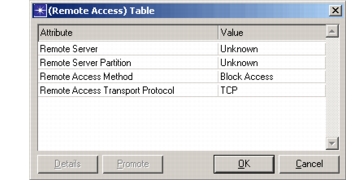
Figure 514: Remote Access Table
-
Remote Server. The name of the server whose's storage partition is to be accessed. The active attribute handler lists all the "Server Address" attribute values of the servers whose "Server Address" attribute is not set to "Auto Assigned".
-
Remote Server Partition. The storage partition on the remote server specified above. The active attribute handler lists all the storage partitions defined on the remote server. Whenever the "Remote Server" value is changed, the value of this attribute is reset to "None".
-
Remote Access Method. The access method used to access remote partition. The access method defines the list of allowable transport protocols to access the remote partition.
-
Remote Access Transport Protocol. The transport protocol to be used to access the remote partition. The server that initiates the remote partition access is called the "Remote Storage Client" and the server that processes the access request is called the "Remote Storage Server".
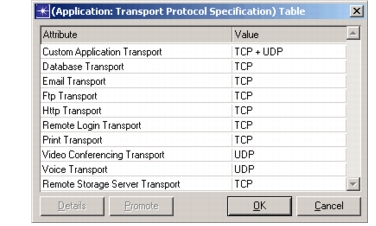
For the "Remote Storage Client" and the "Remote Storage Server" to communicate, this attribute value should match the "Remote Storage Server Transport" value specified in the "Application: Transport Protocol Specification" attribute of the "Remote Storage Server".
Figure 515: Remote Storage Server Transport
Write Caching. Allows the user to enable or disable write caching. If write caching is enabled, a write operation submitted a job is started and the job is notified that the operation is complete, so that the job can continue with its next processing step. The write operation is carried out in the background. Note: The "Storage Partition Response Time" statistic in this case is added a value of zero and the "Storage Partition Completion Time" statistic is added the actual write completion time.
Replication. The replication feature of the server models allows write operations to be replicated on to a remote server's storage partition. The primary storage partition can be of any type: Local, Measured or Remote. Three methods of replication are supported:
- Write-Replicate - write data to the primary partition, after the write operation is complete start the replication operation
- Replicate-Write - replicate first (that is write to the remote server first) and after the replication operation is complete start the write operation to the primary partition.
- Simultaneous - start the write operation to the primary partition and the replication operation at the same time.
In each method the replication can either be
- Synchronous - wait for an acknowledgement from the remote server that the replication operation is complete.
- Asynchronous - do not wait for acknowledgement from the remote server, issue the replication operation and proceed.
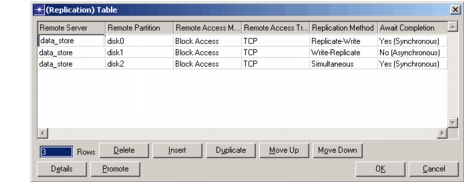
The primary storage partition may request the write to be replicated to multiple remote servers, each replication can have its own replication method.
Figure 516: Replication Table
-
Remote Server. Same as described above for the "Remote Access" compound attribute.
-
Remote Partition. Same as described above for the "Remote Access" compound attribute.
-
Remote Access Method. Same as described above for the "Remote Access" compound attribute.
-
Remote Access Transport Protocol. Same as described above for the "Remote Access" compound attribute.
-
Replication Method. Can be one of Write-Replicate, Replicate-Write and Simultaneous. See explanation above.
-
Await Completion. Allows the user to control when the replication operation is deemed complete. "Yes (Synchronous)" waits for completion, "No (Asynchronous)" does not await completion.
-
Job Definitions. Expanding on the job definitions provided in the Server Configuration object, this attribute lists the jobs that apply to this specific server, and how they are used.
Figure 517: Job Definitions Attribute
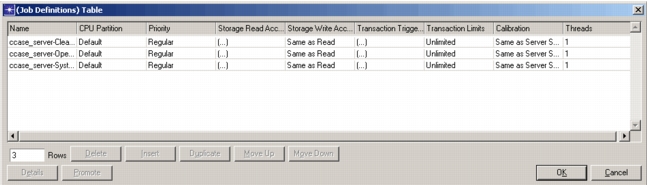
- Name. This is the name of a job defined in the Server Configuration object. You must first define the job in the Server Configuration object before you can assign it to a server.
- CPU Partition. The CPU Partition to which this job is to be bound. You must first define the CPU partition in the 'CPU Partitions' attribute.
- Priority. The server supports 10 levels of priority—0 (lowest) to 9 (highest). For convenience, there are three predefined priority levels: low, regular, and high. At the end of each time slice, the first available, highest-priority job is assigned to the CPU. If a higher priority job becomes active in a midst of a timeslice and a preemptive scheduling algorithm is employed, the lowest priority job holding a CPU is preempted.
- Storage Read/Write Access Distribution. While the general I/O characteristics, such as frequency of occurrence and average size of a process, are determined by its measured properties (and therefore defined in the Server Configuration object), the distribution of these I/O operations over the available storage partitions is dependent on the server's storage partition configuration.
Figure 518: Storage Read Access Distribution
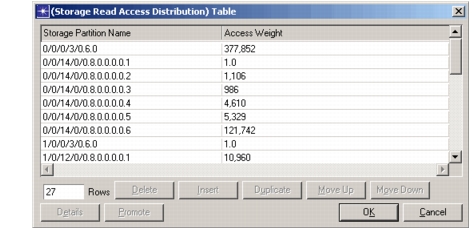
Storage Partition Name. The name of the drive to receive the I/O operation.
Access Weight. Each storage partition is assigned an access weight that determines which storage partition receives an I/O operation. Two storage partitions with equal weights receive an equal number of operations when averaged over a simulation.
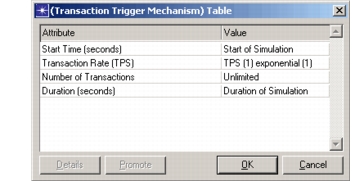
- Transaction Trigger Mechanism. Used to identify how job instances are to be created.
Figure 519: Transaction Trigger Mechanism
- Transaction Limits. Many jobs have restrictions on the number of instances that can be active at a time. For example, your company may have purchased a software with a fixed number of licenses, say 6. Hence you can have a maximum of 6 instances active at any given time. This attribute allows you to configure just that.
Figure 520: Transaction Limits
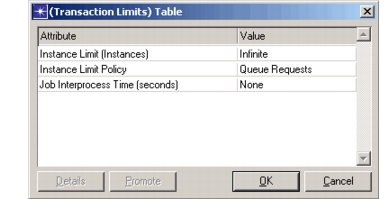
Instance Limit (Instances). The maximum number of instances that can be active at any point in time.
Instance Limit Policy. Determines how a job is handled when the instance limit is reached. When set to "Reject," the job is discarded and never executed. When set to "Queue Requests" the job is queued until an instance completes and the interprocess time expires.
Job Interprocess Time. Under certain circumstances, it may be necessary to specify a minimum time between the end of one Job instance and the start of the next. This affects only jobs with instance limits in place and the "Queue Requests" instance limit policy is in use.
- Calibration. Used for the job-specific calibration values.
- Threads. A job can be run as a single thread or multiple threads. Each thread of a multi-threaded job can run independently of the other threads. On a multi CPU server, a multi-threaded job can potentially complete faster if its threads run in parallel on different CPUs. At the time of job execution, all threads load simultaneously into the server. If the server is multi-CPU, then some or all of the threads are executed in parallel (depending on how many CPUs the server has and their availability at the time of execution).
Note: In the context of Riverbed models, a thread is not restricted in definition to a "POSIX" thread. It can refer to any process (or a collection of processes) of a given job that have the capability to run in parallel.