Modeling Application Usage Patterns
The traffic pattern of an application is not the only determining factor for defining the traffic generated by the application. The following factors also influence the way you will model your traffic:
- How often the application is used
- Usage during each session
- Number of users
- Usage fluctuations
In considering how to model your traffic, take into account the different ways the users can use the application. For example, if you do a 1 MB file download, you will generate a smaller amount of traffic than if you do a 1 GB file download, even with the same FTP application. Consider the most common use cases when modeling the traffic.
Similarly, the duration and usage pattern of the application have a direct impact on the traffic generated. For example, if you browse the Internet several times a day, this is one usage pattern. If another person is constantly using Internet applications in the course of a day, that is a different usage pattern. The duration of use is also important. For the first example, you may model HTTP application usage for one hour, but for the second example, you may model eight hours of HTTP application usage.
In determining the usage pattern, you must also consider the number of users for a given application and whether they use the application concurrently or serially. For example, a sales office with 100 salespersons generates less traffic than does a sales office with 1,000 salespersons.
Traffic patterns tend to fluctuate over the course of a day. If you perform a trending analysis of your network, you may notice that your traffic is heavier early in the morning and after lunch than during the rest of the day. Knowing this information helps you accurately model your network traffic.
Building Profiles Based on Traffic Patterns
A profile captures the usage pattern of a set of applications used in your network. Essentially, this captures all of the applications in use, the time at which each application is started, the duration of use of an application, and the frequency of application use.
For example, if you build a profile to model the typical application usage of an engineer, you might include three applications: Email, HTTP, and FTP. A profile of a salesperson might include all three of these applications plus a sales database application. Each profile must specify when, how long, and how often each user type used these applications.
As with the application configuration object, you must configure profiles in a global object called a Profile Config node, shown in the following figure.
Figure 46: Configuring a Profile
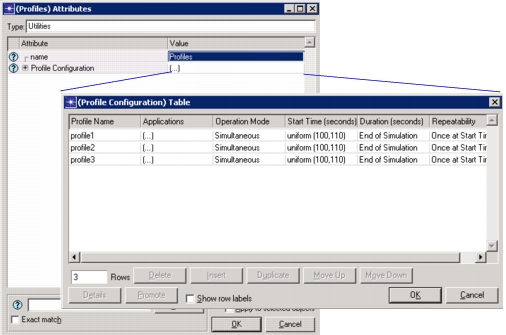
The profile config node has attributes that let you configure timing, repeatability, and sequencing. These attributes are related, so changing one attribute impacts the others. Together the attributes determine the traffic pattern that is generated during the simulation. The following section explains these attributes.
Understanding Timing, Repeatability, and Sequencing
This section describes the concepts of timing, repeatability, and sequencing in relation to applications and profiles within the Profile Definition utility node. Using the information you gathered about application usage and network traffic, you can configure your model accordingly.
- Application Timing describes the specific attributes related to configuring an application within a simulation profile.
- Profile Timing describes the specific attributes related to configuring a simulation profile.
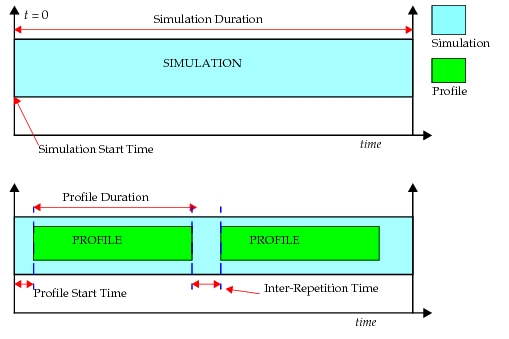
The following figure illustrates a simulation, with a start time and a certain duration. When you add profiles, notice the gap between the start of the simulation and the start of the profile. Each profile has its own duration, and there is a gap (inter-repetition time) between the repetitions of each profile.
Figure 47: Profile Time-Related Attributes
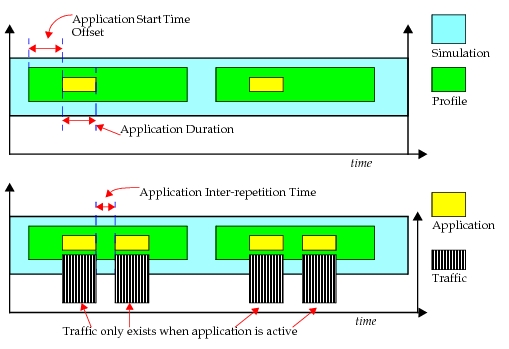
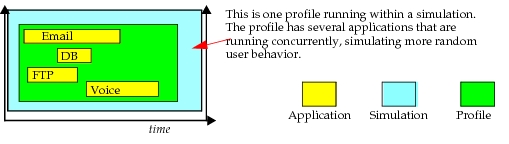
The following figure takes the illustration a step further. Within each profile, applications run. Each application has a start time offset, which determines when the application starts in relation to the profile start time. Each application has its own duration setting. Traffic is generated in the network model only when the application is active, therefore traffic duration equals application duration. The gap between repetitions of the application, if so configured, is the inter-repetition time.
Figure 48: Applications and Time-Related Attributes
The diagrams below depict possible profile configurations, in which the profiles can run serially or concurrently. Different profiles may run serially during a simulation, for example, Profile1, Profile2, Profile3, and so on.
Figure 49: Profiles Running Serially
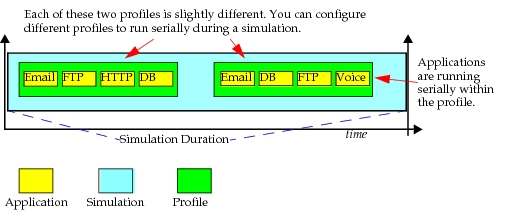
Figure 50: Profiles Running Simultaneously
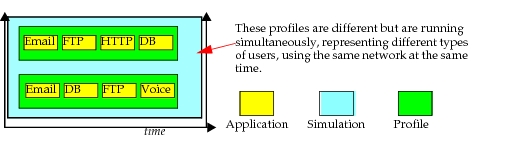
Figure 51: Applications Running Concurrently within Profile
Application Timing
Applications contain many time-related attributes. These attributes determine such things as the start-stop times of the application and have an impact on how much traffic is generated. These time-related attributes include
Key Concept— Application timing is set per-application within individuals profiles in the Profile Definition utility node. Do not be confused by the use of the term “profile” within this section.
- Start Time Offset—This attribute has two interpretations based on the value specified for the “Operation Mode”.
- If the “Operation Mode” is set to “Simultaneous”, this offset refers to the offset of the first instance of each application from the start of the profile.
- If the “Operation Mode” is set to “Serial (Ordered)” or “Serial (Random)”, this offset refers to the time from the start of the profile to the start of the first application. It also serves as the inter-application time between the end of one application to the start of the next. If an application does not end (e.g., duration set to “End of Profile”), subsequent applications won't start.
- Duration—The maximum amount of time allowed for an application session before it aborts. This is often used as a timeout. When set to 'End of Profile', the application will end when the profile duration has expired. When set to 'End of Last Task', the application will end when the last task of the application has completed regardless of task completion times.
- Repeatability—This compound attribute specifies the method for repeating the profile:
- Inter-Repetition Time—Defines when the next session of the profile starts. For applications running serially, this determines the gap between the completion of one application and the start of the next instance, one application running after the other completes. For applications running concurrently, this determines the gap between the start of one application and the start of the next.
- Number of Repetitions—Specifies the distribution name and arguments to be used for generating a random number of times this profile is repeated.
- Repetition Pattern—Defines when the next session of the profile will start.
Figure 52: Time-Related Attributes
Profile Timing
All time-related profile attributes in the Profile Config node have the following characteristics:
- All timing is relative to simulation start time (t = 0), either directly or indirectly.
- Applications may repeat within a profile.
- Applications within a profile have an “Inter-Repetition” time. See Application Timing for more information.
Note: Review Figure 47, Figure 48, Figure 49, Figure 50, and Figure 51 to see how profiles and applications are related to each other and to simulations.
These time-related attributes determine such things as the start-stop times of the profile and have an impact on how much traffic is generated. These time-related attributes include
- Start Time—This is the time at which the profile starts during the simulation. Specify a pre-defined or scripted distribution.
- Duration—This field specifies the amount of time the profile is allowed to run during the simulation. You can choose to let it run until the end of the simulation or the end of the application duration, or select a distribution.
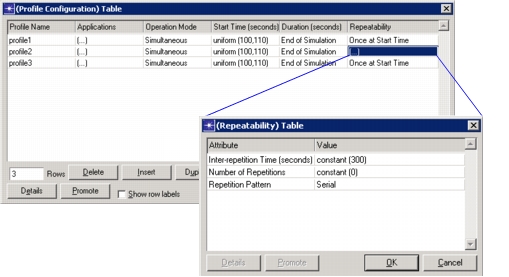
- Repeatability—This compound attribute specifies the method for repeating the profile:
- Inter-Repetition Time—Defines when the next session of the profile starts. For profiles running serially, this determines the gap between the completion of one profile and the start of the next instance, one profile running after the other completes. For profiles running concurrently, this determines the gap between the start of one profile and the start of the next.
- Number of Repetitions—Specifies the distribution name and arguments to be used for generating a random number of times this profile is repeated.
- Repetition Pattern—Defines when the next session of the profile will start.
Figure 53: Time-Related Attributes
Understanding the Impact of Profile Misconfiguration
If a traffic profile is misconfigured, your simulation results will not be as expected. This section describes the potential impact of misconfigurations. The following three cases generate three significantly different amounts of traffic due to a single attribute configured differently.
For example, if you configure the inter-repetition time for an application to a duration greater than the duration of the profile, your application will not repeat.
Figure 54: Applications and Time-Related Attributes
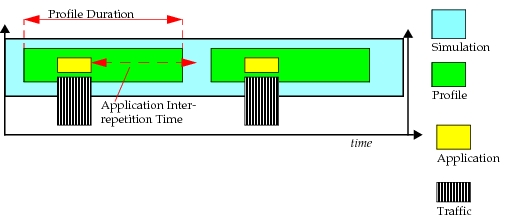
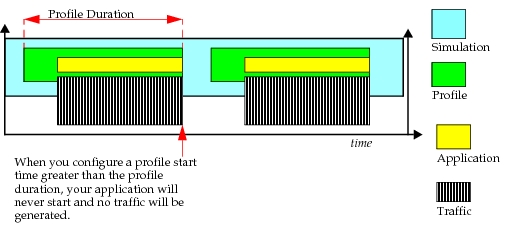
If you set the application duration to “End of Profile”, your application will not repeat, since it will not end until the profile ends.
Figure 55: Applications and Time-Related Attributes
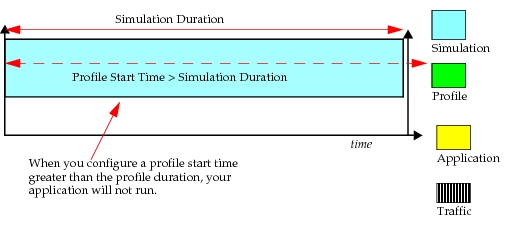
When setting the start time for the profile, be sure it is not greater than the duration of the simulation. For example, if the simulation runs 300 seconds, do not set a profile start time of 350.
Figure 56: Applications and Time-Related Attributes
Configuring the Profiles
Profiles describe the activity patterns of a user or group of users in terms of the applications used over a period of time. You can have several different profiles running on a given LAN or workstation. These profiles can represent different user groups. For example, you can have an Engineering profile, a Sales profile, and an Administration profile to depict typical applications used for each employee group.
Table 14: Profile Attributes
| Attribute | Description |
|---|---|
| Profile Name | Specifies the unique name for this profile. |
| Applications | |
| Name | Specifies the name of the application configured in this row. |
| Start Time Offset | This attribute has two interpretations based on the value specified for the “Operation Mode”. - If the 'Operation Mode” is set to “Simultaneous”, this offset refers to the offset of the first instance of each application (defined in the profile), from the start of the profile. - If the “Operation Mode” is set to “Serial (Ordered)” or “Serial (Random)”, this offset refers to the time from the start of the profile to the start of the first application. It also serves as the inter-application time between the end of one application to the start of the next. If an application does not end (e.g., duration set to “End of Profile”), subsequent applications won't start. - For the special “scripted” distribution, specify a filename (*.CSV or *.gdf) containing the values required as outcomes. Values will be picked from this file in cyclic order. |
| Duration | The maximum amount of time allowed for an application session before it aborts. This is often used as a timeout. - When set to “End of Profile”, the application will end when the profile duration has expired. - When set to “End of Last Task”, the application will end when the last task of the application has completed regardless of task completion times. - For the special “scripted” distribution, specify a filename (*.csv or *.gdf) containing the values required as outcomes. Values will be picked from this file in cyclic order. |
| Repeatability | See Understanding Timing, Repeatability, and Sequencing. |
| Inter-repetition Time (seconds) | Defines when the next session of the application will start depending on the Repetition Pattern. |
| Number of Repetitions | Specifies the distribution name and arguments to be used for generating random session counts. “Unlimited” will allow new sessions to be created up until the “Application Stop Time” specification. |
| Repetition Pattern | Specifies the pattern in which this application repeats, serially or concurrently. |
| Operation Mode | Defines how applications will start. - Serial (Ordered)—They can start one after another in a ordered manner (first row to last row). - Serial (Random)—They can start one after another in a random manner. - Simultaneous—They can start all at the same time. |
| Start Time (seconds) | Defines when during the simulation the profile session will start. |
| Duration (seconds) | Defines the maximum amount of time allowed for the profile before it ends. - When set to “End of Simulation,” the profile is allowed to continue indefinitely until the simulation ends. - When set to “End of Last Application,” the profile is allowed to continue until the last instance of an application running as part of this profile ends. If the application repeatability is unlimited, the profile will end when the simulation ends. - Profiles that repeat should not have their duration set to “End of Simulation”. |
| Repeatability | Specifies the parameters used to repeat execution of this profile. For more information, see Understanding Timing, Repeatability, and Sequencing. |
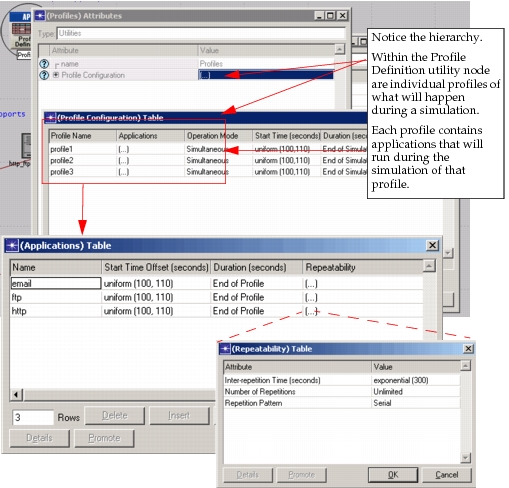
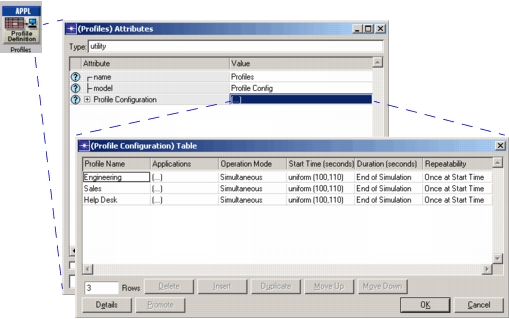
Profiles can execute repeatedly on the same node. Riverbed Modeler enables you to configure profile repetitions to run concurrently (at the same time) or serially (one after the other). In the following figure, three different profiles are configured on the Profile Config node. Each profile contains one or more applications.
Figure 57: Profile Configuration
Profiles contain a list of applications. You can configure the applications within a profile to execute in any of the following manners, relative to the operation mode of the application itself:
- at the same time
- one after another—in a specific order you determine
- one after another—in a random order
In most cases, when describing the actions of a single user, the actions are serial because most people can only perform one activity at a time. However, when using applications that can perform non-blocking tasks, you can have more than one task running at a time. When describing the activities of a group of users, concurrency is common. Like profile repetitions, application repetitions within the profile can execute either concurrently or serially.
The Profile Definition Object defines all profiles that can be used within a scenario. Only profiles that have been defined in the Profile Definition Object can be applied to the workstations or LANs of a project and only applications that have been defined in the Application Definition Object can be used in profile definitions.