Understanding Tasks and Phases
The Custom Application makes use of “global objects” in its configuration, providing two advantages:
- It provides a single place in which to specify information that can be shared by many objects within the network model.
- Large amounts of configuration information can be copied from network to network simply by copying and pasting global objects.
Figure 39: Task Config Node Object
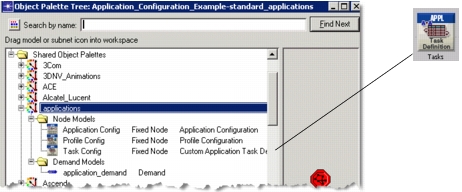
Custom applications are configured using two global objects: the Application Config object and the Task Config object. Tasks function as the building blocks of the custom application and are defined in the Task Config object. Once the tasks have been defined, they are used to build (define) the custom application in the Application Config object. Once defined, the custom application can be used in the profiles that are deployed to the individual workstations or LANs using the application.
Phases of a Task
Before configuring the tasks, described in Procedure 7, you must understand how to configure the phases of each task. The previous section described how to break an application into tasks and a task into phases. Data transfer phases consist of network activity and processing. Each data transfer includes the exchange of many application data units from a source address to a destination address. An exchange involves a sequence of requests (from the source to the destination) and responses (in the other direction).
Figure 40: Serial and Concurrent Request/Response Patterns
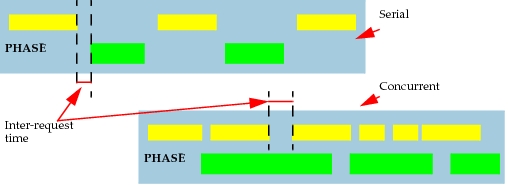
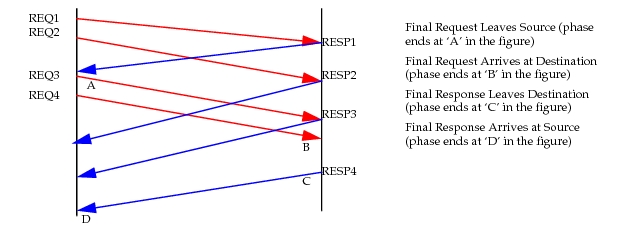
Figure 41: Specify When Phase Ends
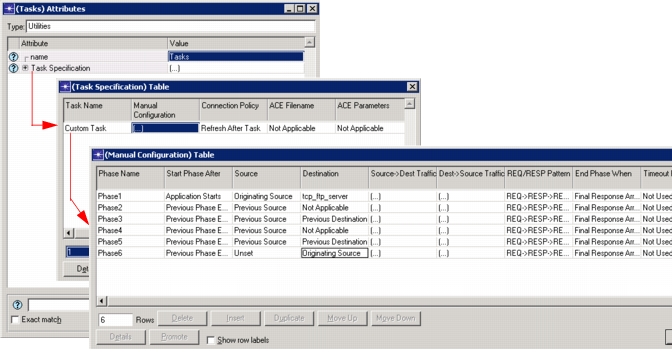
The following figure shows a completed Manual Configuration Table for a task with 6 phases. Note that the second and fourth phases, Transaction #2 and Transaction #4, are processing phases and have the Destination attribute set to Not Applicable. With the exception of the first phase, each phase begins after the final request from the previous phase arrives at its destination.
Figure 42: Phase Configuration
Configure the Tasks
Procedure 7 describes the steps involved in manually configuring tasks. You can also use Transaction Analyzer to record the task details, and then specify the Transaction Analyzer filename in the Task Specification Table.
Each phase you configure in a task has the following attributes, shown in Figure 42 and listed in the following table.
Table 13: Task Phases
| Field Name | Description | Usage |
|---|---|---|
| Phase Name | Specifies a user-defined name that can also be associated with a statistical group name | The statistical group name is optional but can be used to associate multiple phases with a statistical group to measure the time it takes to complete each phase. Results are available after a simulation, as with any DES results. |
| Start Phase After | Specifies when a phase begins | The start of a phase can be - Independent—The source does not depend on the completion of another phase, so you can set “start phase after” to “Application Starts”. - “Previous Phase Ends” is used to specify a sequential phase execution. Each phase starts after the one before it ends. - “Phase name”—Set the field to a specific phase, selectable from the drop-down menu, to indicate that this phase begins when the named phase ends. |
| Source | Specifies the symbolic name of the node that acts as a source for the corresponding phase | - Originating Source—The phase starts on the node that supports the profile containing this custom application. - Previous Source—The node that was the source of the previous phase acts as the source. - Previous Destination—The previous phase’s destination acts as the source for this phase. |
| Destination | Specifies the symbolic name of the node that acts as a destination for the corresponding phase | Similar to “Source” attribute: - Originating Source - Previous Source - Previous Destination - Not Applicable (for processing phases) If the Destination attribute for a processing phase is denoted as “Not Applicable”, then the Dest -> Source Traffic attribute is ignored. If the Destination attribute for a processing phase is set to a multicast address, the Request Processing Time attribute in the Dest -> Source Traffic attribute is used, but the traffic information is ignored and a DES log entry is made. |
| Source -> Dest Traffic | Specifies the parameters for data transfer from the source to the destination. You may also set processing delays here. | - Initialization Time—Time spent in the beginning of the phase, before any packets are sent out. If no requests are sent, then this is a processing phase. - Request Count—The total number of requests from source to destination. - Interrequest Time (seconds)—The amount of time between requests. - Request Packet Size (bytes)—Specifies the number of bytes in each packet. - Packets Per Request—The number of packets sent for each request. - Interpacket Time (seconds)—Specifies the number of seconds between packets within each request. |
| Dest -> Source Traffic | Specifies the parameters for data transfer from the destination to the source. You may also set processing delays here. | - Request Processing Time (seconds)—Time to process a request before sending a response. - Response Packet Size (bytes)—Total size of a response packet. - Packets Per Response—Each response may contain multiple packets. Use this field to specify the usual number. - Interpacket Time (seconds)—Explicit time that server will spend for each response packet. If this is computed at the server: set to ‘Use Server CPU’. |
| REQ/RESP Pattern | Specifies the scheduling of request/response sequences (see Figure 40). | Serial—Next request is not sent out until the response for the previous request arrives. Concurrent—Requests are sent out independent of arriving responses. |
| End Phase When | Specifies the condition which officially marks the end of this phase | See Figure 41. |
| Timeout Properties | Specifies the time limit on the duration of the phase and is useful for recovery from lost packets or aborted connections | - Set a number of seconds after which the phase completes, whether or not all transactions are complete within the phase. - After timeout, execute either next phase or next task. |
| Transport Connection | Specifies transport connection properties, such as the connection policy and number of total allowable connections, and the amount of buffer for application messages | Supported transport protocols: - TCP - UDP - ATM - FC - X.25 You can specify the type of transport, port number, and whether or not to reuse the connection or establish a new one. |
The example below shows three tasks. Two, “Login” and “Logout”, have been manually configured, while the third, “Oracle_Three_Tier”, uses imported data. We will not discuss importing traces and Transaction Analyzer in this section; detailed information on Transaction Analyzer is available in the Transaction Analyzer documentation.
Procedure 7: Configuring Tasks
-
Open the Utilities object palette, and drag a Task Config object into the project workspace.
-
Right-click and choose Edit Attributes.
-
Select Edit… from the Task Specification drop-down menu.
-
Change the Rows value to the number of tasks you need in the Task Specification box.
-
List each task in a separate row of the table.
Figure 43: Task Specification Table
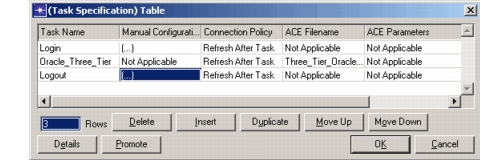
5.1 To configure a task using imported data, simply list the file in the Transaction Analyzer Filename field. 5.2 To manually configure a task, choose Edit… from the Manual Configuration field drop-down menu. In the Manual Configuration Table, change the Rows value to the number of phases in the task.
Manually configuring a task involves detailing the task in its Manual Configuration Table where each row of the table represents a phase. For more information about the configuration of a phase, see [Table 13](applications-model-desc-03-20.md). -
Enter a name for each phase in the Phase Name column of the Manual Configuration Table.
-
Complete the table by specifying values for each attribute.
For more information, see Table 13.
End of Procedure 7
Source Preferences on Nodes
The Application: Source Preferences attribute is an advanced attribute used to identify objects that act as the traffic initiating node for the first phase of a task. Typically, the source specified as part of the first phase of a task originates the task. For example, one node originates a task, such as Login.
When the Task Specification > Manual Configuration > Source attribute on the Task Config object is set to the symbol map “Originating Source”, the attribute resolves to the node on which the Profile is supported. In effect, you are identifying the node as the Originating Source.
For certain advanced applications, you may have more than one source that acts as an independent traffic initiating node. For example, if you have a remote node on which a given profile is supported, but which is not the traffic initiating node for the phase, you must set the Task Specification > Manual Configuration > Source attribute to a unique name other than “Originating Source”. Then set the Application: Source Preferences attribute on the actual traffic initiating node to the symbolic name you identified in the Task Config object.
Note: If the Start Application When attribute in a particular phase is set to “Application Starts”, then the Source configured in this phase is a starter node.