Data Definition
The data definition sub-package (oms_data_def) creates and manages the network-wide attribute database.
Introduction
The network-wide attribute database contains some node model attribute values that are common to more than one object in the network model. Using the database offers two advantages:
- Memory savings. The data is not duplicated at each object; only a pointer to the database entry is stored. This results in smaller model files.
- Faster initialization. Because the data is parsed only once, models initialize faster.
Models that use this database include a unique object in their network models: the common attributes object. These objects, which are protocol-specific, are included in the utilities object palette.
Common attributes objects serve two functions:
-
They define value combinations for commonly-used structured attributes. A value combination is a set of sub-attribute values referenced by a unique assigned name. The following figure shows the compound attribute IP Compression Information, which consists of five sub-attributes: Compression Method, Compression Ratio, Compression Ratio PDF, Compression Delay (sec/bit), and Decompression Delay (sec/bit). The attribute has six value combinations.
Figure 15: IP Compression Information Attribute on IP Attribute Config Object
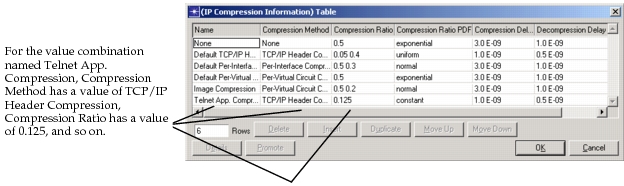
Users specify that an object (workstation, router, etc.) use a specific value combination by selecting the unique name as the value of the attribute.
-
They contain the logic that parses the structured attribute and stores the information into the network-wide attribute database.
All transactions with the database can be viewed in the OPNET Simulation Debugger by activating the label trace oms_data_def.
Procedure 1: Using the Network-Wide Database
- Create or modify a common attributes object. Common attribute objects for some protocols are included in the utilities model list of the object palette. If an object doesn’t exist for the protocol you need, simply create it in the Project Editor. The new common attribute object’s process model should have, as a compound attribute, the common attribute (with commonly-used value combinations defined). Each value combination is a row in the compound attribute table. The attribute should be set (not hidden) at the Node Editor level.
- Declare a data structure that will store the attribute information in the header file (
models/std/include/oms_dat_def_ds_defs.h). - Modify the process model of the common attributes object so it parses the attribute, creates the data structure, fills it with the parsed attribute data, and stores pointers to the actual data in the database. See the instructions on modifying the common attributes object’s process model for details.
- Modify the process model of every object that refers to the common attributes object, so that the object gets the attribute data. The process model code should:
- Use the function
oms_data_def_entry_access ()to request the data from the network-wide attribute database. The object requesting the data must know the data structure of the data requested. - Declare the package (oms_data_def) as external code.
- Include the header file
oms_data_def.h.
- Use the function
End of Procedure 1
The steps below describe how to customize the process model. You can also examine the ip_attribute_definer process model (in the models/std/ip directory) as an example.
Procedure 2: Modifying the Common Attributes Object Process Model
- Add the attribute that will become a common attribute to the process model by selecting Model Interfaces from the Interfaces menu, then define the new attribute.
- In the INIT state of the process model, call a function (for example
attr_def_ip_compress_info_parse) that parses the attribute, fills the data structure, and registers the pointer to the attribute data into the database. - Write the function that does the tasks listed above. Your function must
- Read the information from the attribute (using the function
op_ima_obj_attr_get) and fill the data structure. - Create instances of the data structure that will store the attribute data.
- Allocate memory for those instances (using the function
op_prg_mem_alloc). - Register the data into the database by passing the pointer to the data structure. (The function
oms_dat_def_entry_insertdoes this task.)
- Read the information from the attribute (using the function
End of Procedure 2
Data Definition Functions
The functions that implement the data definition (oms_data_def) operations are described in the following sections.