OPNET Model Support (OMS) Package
Some of the sub-packages contained in the OMS package are listed in the table below:
Table 3: OMS Sub-Packages
| Sub-Package | Description |
|---|---|
| Auto-Addressing (oms_aa) | Assigns and manages network addresses, and includes procedures for obtaining destination addresses during a simulation. |
| Advanced Wireless Package (oms_wp_phy) | Manages the advanced wireless package. |
| Data Definition (oms_data_def) | Manages the network-wide attribute database. |
| Buffer Management (oms_buffer) | Manages a hierarchy of memory pools and buffers. |
| failure-recovery (oms_failrec) | Models the failure and recovery of one or more objects in the network. |
| Geocentric Computing (oms_geo) | Defines procedures that can be used to determine the radius of the earth in meters and to compute the shortest path between the source and the destination along the earth. |
| Process Registry (oms_pr) | Defines procedures that allow defined processes to input, access, and share information from a model-wide registry. |
| Topology Analysis (oms_tan) | Defines procedures that obtain information about stream indices between modules connected by packet streams. |
Required Files
Each OMS sub-package has two associated files that are required when the sub-package functions are used. Header (.h) files are located in the <reldir>/models/std/include directory. Source (.ex.c) files are located in the <reldir>/models/std/utilities/oms directory.
Table 4: OMS Sub-Package Files
| Name | Description |
|---|---|
oms_<sub-package>.h |
Contains the data type definitions and the symbolic constants for the OMS sub-package functions. |
oms_<sub-package>.ex.c |
Contains the definitions for the OMS sub-package functions. |
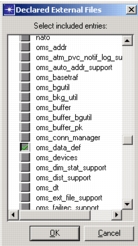
When using an OMS sub-package, the corresponding external file should be included in the process model. In the Process Editor, choose Declare External Files from the File menu.
Figure 13: Including External Files When Using an OMS Sub-package
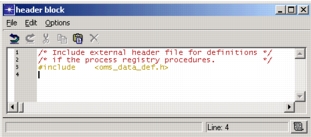
The header block (HB) of the process model should also declare the related include file. In the Process Editor, choose Header Block from the Code Blocks menu to display the header block: