Defining the Class Mapping File
The class mapping file is the critical element of the HLA integration. The HLA-PM in the HLA interface node model uses this file to perform two transformations:
-
Converting Modeler entities to HLA entities and vice versa, as shown in the following table:
Table 3: Modeler–HLA Conversions
Modeler entity HLA entity Object type Object type Attribute Attribute Packet Interaction Packet field Parameter -
Assigning data types to the Modeler entities. HLA entities are not typed.
The class mapping file, whose syntax mimics the syntax of a .fed file, is a text file prepared in your editor of choice. Save it in the same directory as the associated network model, with the file extension .map. Configure the HLA Class Mapping File simulation attribute to list the path name for this file. See “HLA-PM Attributes” on page 12 for details on this attribute.
The rules you follow to define the class mapping file are listed and discussed in this section. For a comprehensive list of the rules, see “Class Mapping File” on page 41.
Class Mapping File
The overall format of a class mapping file is defined below. This definition, and all others, is specified using a subset of the Backus-Naur Form (BNF), in which bold type indicates text you type as shown. See “BNF Notation” on page 39 for details of the conventions used.
<MapFile> ::= ( mapping version 2 [<Mapping>]+ )
<Mapping> ::= <TypeDefs> | <ObjectMaps> | <InterMaps>
-
To reflect the
.fedsyntax, the mappings are enclosed in parentheses and preceded by the keyword “mapping”. The version number is 2 at present. Different numbers will be used if future versions of the mapping syntax develop. -
Mappings can include type definitions (
<TypeDefs>, see Type Definitions), object class mappings (<ObjectMaps>, see Object and Attribute Mappings), and interaction class mappings (<InterMaps>, see Interaction/Parameter Mappings).
Type Definitions
The SOM/FOM specifications allow enumerated and complex data types for attributes and parameters. Enumerated data types are used to limit the set of possible values for a given attribute or parameter.
Note: Although Modeler allows enumerated data types, it does not check for allowable values in enumerated types. For mapping purposes, the type of an enumeration is simply the type of the values of the enumeration.
For parameters, the HLA-PM handles only the conversion of basic types, passing more complex values to the destination process models as blocks of bytes with the data type structure.
HLA attribute and parameter data types can be divided into three categories, each with a corresponding Modeler representation.
-
HLA attributes and parameters with SOM/FOM basic data types (integer, floating-point, and string data types of cardinality 1) can be directly mapped to Modeler scalar types, as shown in the following table.
Table 4: SOM/FOM to Modeler Data Type Mapping
SOM/FOM basic types Modeler type string string short unsigned short
long unsigned long
long long unsigned long long¹
char octetinteger boolean boolean float double double Note 1: Parameters with long long and unsigned long long values are not converted to integers. The byte representation of the value is stored in a structure field to be parsed by the destination process model.
-
HLA attributes (but not parameters) with SOM/FOM scalar array data types (integer, floating-point and string data types of cardinality greater than 1) are mapped to an Modeler compound attribute containing a single scalar subattribute of the appropriate Modeler type, as shown in the table above.
Parameters with scalar array data types are delivered to the destination process model as blocks of bytes with the data type structure.
-
HLA attributes of complex data types (equivalent to C structs and arrays of structs) are mapped to an Modeler compound attribute containing N subattributes, each of the appropriate Modeler type for the corresponding SOM/FOM sub-data type.
Parameters with complex data types are delivered to the destination process model as blocks of bytes with the data type structure.
The format of a type definition section is the following:
<TypeDefs> ::= ( types [<TypeDef>]+ )

<TypeDef> ::= ( <Name> [<FieldDefs>]+ )

<FieldDefs> ::= ( attribute <FOM_Name> <OPNET_Name> <Type> )

<Type> ::= <FOM_Type> | <Name>

<FOM_Type> ::= <IntegerType> | <FloatType> | boolean | string

<IntegerType> ::= short | unsigned_short | long | unsigned_long | long_long | unsigned_long_long	 | char | octet

<FloatType> ::= float | double
<OPNET_Name> is the Modeler attribute name of a compound structure. The FOM name is not used during mapping and is simply placed here for reference. If the FOM type represented is a scalar type of cardinality greater than 1, enter “none” for the FOM name.
The example type definition below defines the types position2D and position3D to represent locations in 2D and 3D space. The FOM name is in upper case, the Modeler name in lower case.
(types
   (position2D
      (attribute FOM_X opnet_x double)
      (attribute FOM_Y opnet_y double))
   (position3D
      (attribute FOM_2D opnet_2d position2D)
      (attribute FOM_Z opnet_z double)))
For a description of how values of the various data types are encoded and decoded by the HLA-PM, see Representing Attribute and Parameter Values.
Object and Attribute Mappings
Object and attribute mappings relate HLA object classes to Modeler types and HLA attributes to Modeler attributes. Every attribute of an HLA object class need not map to an attribute of the corresponding Modeler type, or vice-versa. HLA attributes that are not mapped will not be seen by the Riverbed federate, and, similarly, Modeler attributes that are not mapped will not be seen by other federates.
The format of an object mapping section is the following:
<ObjectMaps> ::= ( objects [<ObjMap>]+ )

<ObjMap> ::= ( class <ObjClass> [<ObjAttr>]+ [<ObjMap>]* )

<ObjClass> ::= <HLAClassName> <OpnetObject> <OpnetMobility> <ClassSet> <Create>

<OpnetObject> ::= node | subnet | all

<OpnetMobility> ::= fixed | mobile | satellite | any

<ClassSet> ::= ( class_set <OpnetObjectMatch> )

<OpnetObjectMatch> ::= ( <AttrName> <Oper> <Value> <OPNET_Type> ) |
	( not <OpnetObjectMatch> ) |
	( and <OpnetObjectMatch> <OpnetObjectMatch> ) |
	( or <OpnetObjectMatch> <OpnetObjectMatch> )

<Oper> ::= == | != | < | <= | > | >= | prefix | contains | suffix

<OPNET_Type> ::= integer | boolean | double | string

<Create> ::= ( creation_mode <CreateMode> )

<CreateMode> ::= create [ <AttrName> <Type> ] |
	discover <RTIMatch> |
	dynamic <RTIMatch>

<RTIMatch> ::= attr_match <AttrName> |
	name_match <AttrName> <Type>

<ObjAttr> ::= ( attribute <HLAName> <AttrName> <Type> <PS> )

<AttrName> ::= <Name> | <Name> [ <Number> ] . <AttrName>

<PS> ::= P | S
-
<ObjMap>line—Each object mapping contains the class-wide mapping method (<ObjClass>line) and a list of attribute-specific mappings (<ObjAttr>line), followed by optional mappings for HLA object subclasses. -
<ObjClass>line—The class-wide mapping information is interpreted as follows:Table 5: Class-Wide Mapping Information
Rule Element Interpretation <HLAClassName>the HLA class name <OpnetObject>the kind of Modeler object (node, subnet, or all), as specified in the <OpnetObject>rule<OpnetMobility>the kind of Modeler mobility (fixed, mobile, satellite, or any), as specified in the <OpnetMobility>rule<ClassSet>the set of Modeler elements that maps to the HLA class name, as specified in the <ClassSet>rule<Create>how a discovered HLA object is mapped to an Modeler object or how an HLA object is created from an Modeler object, as specified in the <Create>rule -
<ClassSet>line—A given HLA class can be mapped to various sets of Modeler objects. An object belongs to the set if it satisfies the rule specified in the<OpnetObjectMatch>line. -
<OpnetObjectMatch>line—Here are two examples of the<OpnetObjectMatch>rule in which HLA classes are matched to Modeler models. In the first case, one HLA class, H1, is mapped to one Modeler node model, NM. This is indicated as: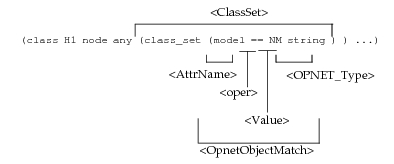
In the more complex case, the HLA class H2 is mapped to fixed subnets with the string “Europe” in their name:
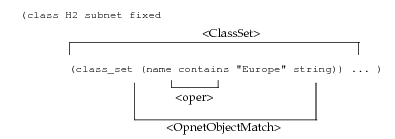
The Modeler type (string) must be provided to distinguish between the string representation of numerical values and actual strings.
The
<AttrName>portion should be one attribute of the Modeler element, not necessarily one that is mapped to an HLA attribute. -
<Oper>line—The relational operators<,<=,>, and>=apply only to numerical attributes. “prefix”, “contains”, and “suffix” apply only to string attributes. -
<Create>line—Indicates the creation mode used to map Modeler and HLA objects during the simulation. -
<CreateMode>line—Specifies the creation mode that will be used to create HLA instances (only one mode can be specified). The three possibilities are:- create (creates an HLA instance for all possible Modeler objects)—At the beginning of the simulation, create an HLA object for all Modeler objects that match a mapping rule. No HLA objects will be created during the simulation, though some may be removed. No discovery of HLA objects will occur. The set of Modeler objects is static and all possible matches have already been made. The name of the object is generated using the specified attribute. The attribute type is needed so the HLA-PM can generate a string based on the attribute value. Only simple attribute types are allowed (integer, floating point, and string).
- discover (maps a discovered HLA instance to an appropriate Modeler object, but does not create objects). An HLA instance created by another federate is discovered during the simulation by the HLA interface. No HLA objects will be created during the simulation, though some may be removed.
- dynamic (map a discovered HLA instance or allow an HLA instance to be created). Map an HLA instance created by another federate to an Modeler instance or allow Modeler process models, using
op_hla_obj_create_notify(), to create HLA instances as needed.
-
<RTMatch>line—If you specified “discover” or “dynamic” creation modes in the<Create>rule, use this rule to specify how discovered HLA objects will be matched to the Modeler object.If the HLA objects are named, use name_match. With this method, the name field of a
discoverObjectInstance()RTI callback contains the value to be matched with the Modeler attribute (usually the name attribute). The Modeler attribute and type that will be compared to the HLA name value must be indicated.Say, for example, that you want to map objects in the HLA class Svr to Modeler objects having the name serverN (server1, server2, and so on). You would write the following rules:
(class Svr node fixed
	(class_set (name contains “server” string)
	(creation_mode discover name_match name string)
If the HLA objects are not named, use attr_match. With this method, the HLA-PM matches an HLA attribute with an Modeler attribute. The Modeler attribute, which should appear in the attribute mapping list, is compared to the value of the mapped HLA attribute. Type information is not needed for the attribute match since it is specified in the attribute mapping information.
Say, for example, that you want to map objects in HLA class Soldier with the attribute serial_number to Modeler objects of model soldat having the attribute user id. You would write the following rules:
(class Soldier node fixed
	(class_set (model == soldat string))
	(creation_mode discover attr_match “user id” )
	(attribute serial_number “user id” short S)
Quotes are used so Modeler will interpret the string “user id” as a single entity, even though it contains a space.
-
<ObjAttr>line—An attribute-specific mapping is enclosed in parentheses and starts with the keyword “attribute” followed by the HLA attribute name (<HLAName>), the Modeler attribute name (<AttrName>), the type of the attribute (<Type>), and the publish/subscribe information (<PS>).Type names (
<Type>) must be defined before being used (see Type Definitions). -
<AttrName>line—In most cases, the Modeler attribute name is the attribute itself (x position, for example). For compound attributes, the attribute name can be an attribute of one of the subobjects of the compound, as in “subqueue[3].bit capacity”. Quotes are required if spaces appear in the name. -
<PS>line—Publishing an attribute (P) indicates that it can be modified by the federate (assuming that the federate has ownership of the attribute). Subscribing to an attribute (S) indicates that the federate wants to be notified when the value of that attribute is modified by another federate.
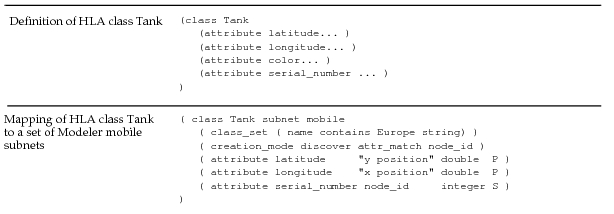
The following example shows how the rules shown in the <ObjMap>, <ClassSet>, <RTMatch>, and <PS> lines are applied to map the .fed-represented HLA class Tank to all Modeler mobile subnets whose names contain the string “Europe”. The Modeler attribute node_id is used for matching.
Interaction/Parameter Mappings
The Modeler structure corresponding to an HLA interaction is the packet, which has a name (with a specific size and data type) and fields (each with a specific size and data). Fields correspond to interaction parameters. Packets, as used in this HLA integration, do not represent actual communication data packets. They are delivering blocks of bytes that represent HLA interactions. The reception of an HLA interaction is mapped by the HLA-PM to an Modeler stream interrupt at an appropriate module (see Handling Incoming Data).
Mapping between HLA interactions and Modeler packets follows the rules you include in the interaction mapping section of the class mapping file. Use these formats.
<InterMaps> ::= ( interactions [<InterMap>]+ )

<InterMap> ::= ( class <InterClass> [<InterParam>]+ [<InterMap>]* )

<InterClass> ::= <HLAInteractionName> <OPNETPacketName>

<InterParam> ::= ( parameter <HLAParamName> <OPNETFieldName> <HLAParamType> )

<HLAParamName> ::= <Name> | <tag>

<HLAParamType> ::= <IntegerType> | <FloatType> | boolean | structure
-
<InterMaps>line—A group of interaction mappings is enclosed in parentheses. The group starts with the keyword “interactions”, followed by one or more interaction mappings. -
<InterMap>line—Each interaction mapping is enclosed in parentheses. It starts with the keyword “class”, followed by the class-wide mapping (<InterClass>) and a list of parameter-specific mappings (<InterParam>). Mappings for HLA interaction subclasses are placed within the parent’s mapping after the parameter-specific mappings. -
<InterClass>line—The class-wide mapping is the name of the HLA interaction and the name of the Modeler packet structure. -
<InterParam>line—Each parameter-specific mapping is enclosed in parentheses. It starts with the keyword “parameter”, followed by the HLA parameter name (<HLAParamName>), the Modeler field name (<OPNETFieldName>), and the type of the HLA parameter (<HLAParamType>). -
<HLAParamName>line—The special name<tag>indicates that any tag value received with the interaction should be placed in the corresponding field of the created packet. If<tag>is not present in the mapping, no tag values are passed to the process model that receives the interaction. Use of the<tag>token is optional. -
<HLAParamType>line—Integer, floating-point, and boolean data types with a cardinality of 1 are converted. Boolean FOM values should be stored in integer packet fields. Other data types are converted to a block of bytes (structure). See Delivering Interactions and Generating Interactions.Values of type long long and unsigned long long are not converted to the Modeler integer field type. In these cases, you should specify the packet field type as structure. This allows the destination process model to extract the appropriate value.
The SOM also specifies which interactions the federate initiates, senses, or processes. This information is not part of the mapping file. See Delivering Interactions and Generating Interactions.
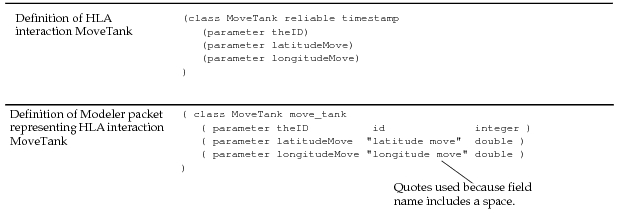
The following example shows how the rules defined in the <InterMap> and <InterParam> lines are applied to map the .fed-represented HLA interaction MoveTank to the Modeler packet move_tank, with the fields “id”, “latitude move”, and “longitude move”.
Rule Constraints
It is possible to create a mapping file with multiple mapping rules applying to the same object class. The following constraints are enforced by the HLA-PM.
-
An HLA object class can only be mapped once. If the file contains multiple rules applying to the same HLA object class, a parse error is generated.
-
An HLA attribute for a given class can only be mapped once. Multiple rules generate a parse error.
-
An HLA interaction class can only be mapped once. Multiple rules generate a parse error.
-
An HLA parameter for a given interaction can only be mapped once. Multiple rules generate a parse error.
-
If multiple rules apply to a single Modeler object class, the first applicable rule encountered while parsing the mapping file is used. Say, for example, that you write two mapping rules, as follows:
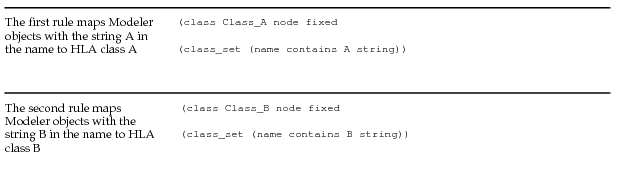
Any Modeler object with the string A in the name (including those named AB or BA) will be mapped to Class_A. The rule for Class_B will never be applied to these cases.