Managing and Advancing Time
The Riverbed federate is a time-constrained and time-regulating federate, by default. These characteristics affect how time advances in the Modeler simulation, and how global time (federation time) advances when a Riverbed federate is part of the federation.
Federation Time Management
A federation is made up of multiple federates, each with its own logical time and its own rate of time progression. The federation
- maintains the global logical time, independent of the individual federate logical times.
- sorts the many events generated by the different federates into a logical sequence and delivers each event to the federate at the appropriate time.
- governs the progression of Modeler’s time (the Riverbed federate is a time-regulating and time-constrained federate).
The following table lists common time-related terms.
Table 1: Time-Related Terms
| Term | Definition |
|---|---|
| TSO events | Time stamp ordered events. An event generated by a time-regulating federate that is time stamped by the RTI. The event is delivered to the destination federate only when the federate’s time matches the event’s time. |
| time-regulating federate | A federate that participates in the determination of federation time. Time-regulating federates can generate TSO events. |
| time-constrained federate | A federate whose logical time is governed by the federation’s logical time. This type of federate receives TSO events in chronological order, based on the federation-assigned time stamp. Other federates may receive events as they are generated, and so not necessarily in time sequence as the federation understands it. |
| lookahead | Time period between the federate’s logical time and the minimum allowable time-stamp of TSO events generated by the federate. Adding this period avoids potential deadlocks when multiple time-regulating federates are at the same point in time. Lookahead is set with the simulation attribute HLA Lookahead. For more information, see HLA-PM Attributes. |
Federation logical time advances only when all time-regulating federates can ensure that no more events will be generated for the current time. The federation logical time then advances to the next time. Each time-constrained federate is informed of the time advance by a callback and advances its own logical time to the federation time. The time of a time-constrained and time-regulating federate never advances ahead of the federation time.
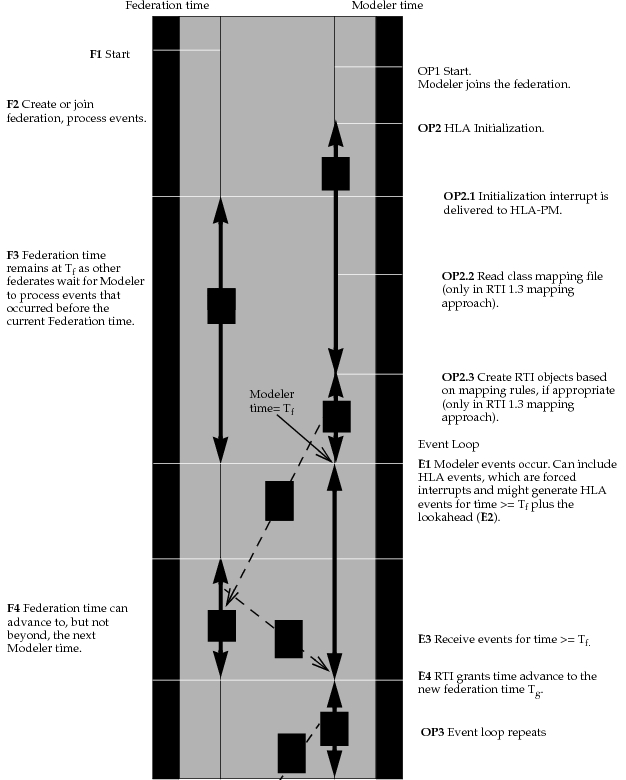
The following figure shows the time synchronization that occurs just after Modeler joins a federation and the event loop that occurs while Modeler is a member of the federation.
Figure 2: Time Line After Modeler Joins a Federation and Event Loop During Membership
HLA-Modeler Time Management
The HLA-PM manages time with HLA by maintaining the following invariant:
At time T, the Riverbed federate performs time management. This means it requests permission to advance in time. Modeler executes all other events scheduled for time T before making the time management request.
Time management is set up during the HLA module initialization. Thereafter, the time management (that is, the request to the RTI for time advance) occurs as part of the event loop.
Time Management During the Event Loop
When the last event for time T has been executed, the HLA-PM requests permission to advance to time T_next, the time of the next scheduled Modeler event. It receives permission to advance to time T_next or to an earlier time. The advance might be to a time earlier than T_next because there could be an HLA event for a time between T and T_next that now needs to be delivered to a Modeler process model.
Now time has advanced to some new value T_new (which is smaller than or equal to T_next) and the simulation has an internal Modeler event to be processed. Control returns to the Simulation Kernel for processing of events.
Time Representation with MÄK versus Pitch RTIs
MÄK provides a default time implementation with its RTI, whereas Pitch pRTI uses a time class provided by Riverbed. Pitch assumes that time is stored in integer format based on microseconds. To deal with arbitrary Riverbed simulation times, however, the provided time class uses the lower 18 digits of the time integer to represent the decimal value.
This difference affects time display in traces. Pitch tracing assumes that time is represented as an integer holding 10e-6 fractions of a second, whereas the Riverbed implementation of time uses an integer holding 10e-18 fractions of a second. As a result, 1 second is displayed as 1,000,000,000,000 seconds in Pitch traces.
Before using Pitch pRTI for the first time, do the following procedure to modify it to use the Riverbed time implementation.
Procedure 5: Configuring Pitch pRTI Time Usage
-
Add the Riverbed time implementation file to the CLASSPATH for both the LRC and CRC computers:
-
1.1 Locate the RTI startup script. On Windows, for example, look for:
C:\Program Files\prti1516\bin\pRTI 1516.bat -
1.2 Replace the contents of the RTI startup script with the Riverbed-supplied version located in
<reldir>\sys\utilities\hla\example:prti1516.bat(Windows)prti1516.sh(Linux)
-
-
Run the pRTI LRC Settings Editor and do the following:
-
2.1 Verify that the Process Model selection is one of the following:
- Optimized Tick
- Legacy Tick
Note: Do not use Multi-threaded.
-
2.2 Set the User-defined Time fields as follows:
Time Factory Class: com.opnet.ophla1516pitch.LogicalTimeFactoryDoubleOpnet
Time Interval Factory Class: com.opnet.ophla1516pitch.LogicalTimeIntervalFactoryDoubleOpnet
-