The Key Mapping Editor
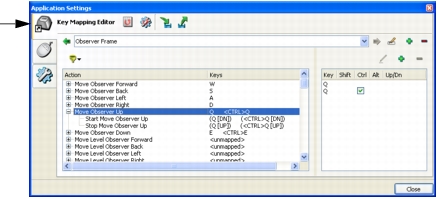
The Key Mapping Editor (Figure 237) lists all of the functions that you can control from the keyboard and the keys to which they are mapped. Some functions are mapped to more than one key or key combination. A key can be mapped to more than one function (combined mappings). You can:
- Edit a function’s key mappings
- Add new mappings
- Delete mappings
Changes are saved automatically.
Figure 237: Key Mapping Editor
Binary Key Mappings
Many navigation functions require you to press and hold a key. For example, you press and hold W to move the observer forward. (By contrast some keyboard actions are toggles or unary functions, such as pressing period to attach to the next entity.) For these actions, 3D Network Visualizer needs to keep track of when the key is pressed down (start the action) and when it is released (stop the action). To a human user, a function like Move Observer Forward is experienced as one action. But the computer experiences it as two actions. Therefore, key mappings must take this into account. The Key Mapping Editor shows the key mappings for these functions as paired functions that are subordinate (children) to the primary function (the parent), as shown in the Move Observer Up entry in Figure 237.