Filtering HLA Exercises by Class
You can filter HLA exercises by class.
Procedure 175: Filtering Logger Input and Output by Class
-
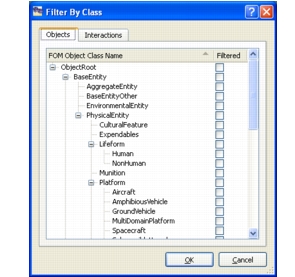
Choose Filter > By Class. The Filter By Class dialog box opens (Figure 148).
Figure 148: Filter By Class dialog box
-
Select the Objects tab to filter object classes. Select the Interactions tab to filter Interaction classes.
-
To change the filtering status of an object, select or clear the check box in the Filtered column for that object.
Note: Selecting or clearing a parent object selects or clears all of its child objects.