Attach Modes
Attach modes are combinations of position and orientation models and constraints that produce a useful behavior for the observer. Except for absolute mode, attach modes describe how movement of the entity to which the observer is attached affects the position and orientation of the observer.
3D Network Visualizer supports the following attach modes:
- Absolute Mode: The observer is not attached to an entity; it moves in space independently of all entities.
- Follow Mode: The observer position and heading changes with the entity's position and heading.
- Mimic Mode: The observer position and orientation changes with the entity's position and orientation.
- Tether Mode: The observer's position changes with the entity's position.
- Track Mode: The observer's heading changes to track the entity's position and heading.
- Tether Track Mode: The observer's position changes with the entity's position while its heading is focused on a second entity.
- Mimic Track Mode: The observer's position changes with the entity's position while its orientation is focused on a second entity.
The attach modes are described in detail in the following sections. For details about how to attach the observer to an entity, please see Attaching the Observer to an Entity or Prop.
Absolute Mode
In Absolute, or free-fly mode, the observer is not attached to an entity. Movement of entities does not affect the observer in any way.
Follow Mode
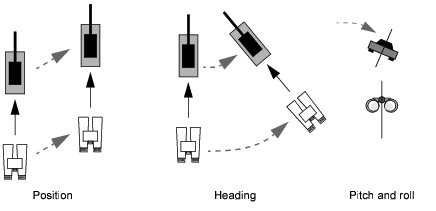
In Follow mode, the observer maintains its relationship to the attached entity as follows:
- When the entity's position changes, the observer's position changes to maintain its offset
- When the entity's heading changes, the observer's heading and position change to maintain the offset
- When the entity's pitch or roll change, the observer pitch and roll do not change.
Figure 48 illustrates the characteristics of Follow mode.
Figure 48: Follow mode
Mimic Mode
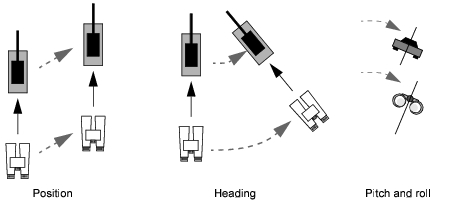
In Mimic mode, the observer behaves as though it is rigidly connected to the entity. Use Mimic mode to create the effect of riding in a vehicle cockpit, or of following a vehicle from an external location while connected to it by a solid, invisible rod. The observer maintains its relationship to the attached entity is as follows:
- When the entity's position changes, the observer's position changes to maintain its offset
- When the entity's heading changes, the observer's heading and position change to maintain the offset
- When the entity's pitch or roll change, the observer's pitch and roll change and the observer's position changes to maintain its offset.
Note: When cockpit displays are enabled, you cannot change the position or orientation of the observer relative to the entity.
Figure 49 illustrates the characteristics of Mimic mode.
Figure 49: Mimic mode
Mimic Track Mode
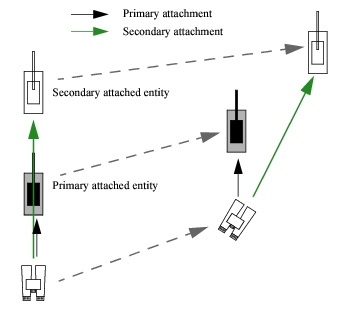
Mimic Track mode combines Mimic mode and Track mode. The observer's position changes with that of the entity to which it is attached, as in Mimic mode, while its orientation changes to remain focused on a secondary, tracked entity.
Orientation controls are disabled.
Figure 50: Mimic Track mode
Tether Mode
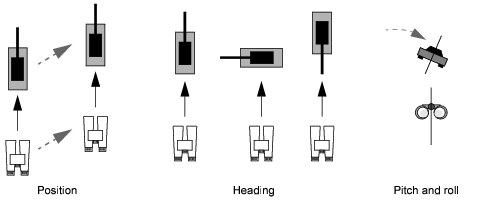
In Tether mode, the observer's maintains a constant offset from the attached entity, but it is not affected by the entity's heading, pitch, or roll, as follows:
- When the attached entity's position changes, the observer's position changes to maintain its offset
- When the attached entity's heading changes, the observer's heading does not change
- When the attached entity's pitch or roll change, the observer's pitch and roll do not change.
Figure 51 illustrates the characteristics of Tether mode.
Figure 51: Tether mode
Track Mode
In Track mode, the observer's heading changes to track the attached entity's movement, keeping it centered in the field of view. The observer's position does not change. The observer maintains its relationship to the attached entity as follows:
- When the attached entity's position changes, the observer's heading changes to keep the entity centered in the observer's view; the observer's position does not change
- When the attached entity's heading changes, the observer's heading does not change
- When the attached entity's pitch or roll change, the observer's pitch and roll do not change.
Figure 52 illustrates the characteristics of Track mode.
Figure 52: Track mode
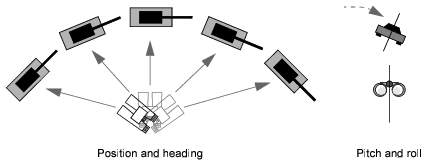
Tether Track Mode
Tether Track mode combines Tether mode and Track mode. The observer's position changes with that of the entity to which it is attached, as in Tether mode, while its orientation changes to remain focused on a secondary, tracked entity.
Orientation controls are disabled.