The 3DNV Display Engine
3D Network Visualizer applications have a component called a display engine. The display engine renders visual data. A display engine can also control the display on remote display engines.
3D Network Visualizer includes an application called the 3DNV Display Engine. A 3DNV Display Engine has a very limited GUI. Its primary purpose is to provide windows that can be controlled by a 3D Network Visualizer application’s (master) display engine.
The master display engine can connect to multiple 3DNV Display Engines (typically running on other computers) and control what is displayed in their windows.
Note: For the remainder of this documentation, we will assume that you remember that 3D Network Visualizer has a display engine that can control VR-Vantage Display Engine applications, and will refer to VR-Vantage Display Engine applications as display engines or external display engines (to distinguish them from the display engine in 3D Network Visualizer).
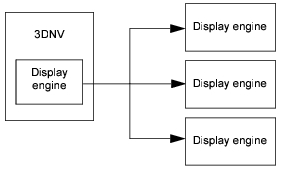
3D Network Visualizer drives all of the display engines it is connected to, as illustrated in Figure 54.
Figure 54: 3D Network Visualizer and display engines
Note: Display engines must have the same terrains, models, and other visualization data available as 3D Network Visualizer. To replicate settings from a 3D Network Visualizer application to a display engine, copy the data directories (
./appdata,./data, and./userData) from the computer on which 3D Network Visualizer is installed to the computer on which the display engine is installed. Then import the settings into any Settings page that you customized on the 3D Network Visualizer machine.
For a complete discussion of display engines, please see Chapter 12 “Windows, Channels, and Display Engines” on page 181.
How 3D Network Visualizer Responds to Display Engine Connections
3D Network Visualizer reloads the current scene each time a display engine is connected. This ensures that the display engine has an exact duplicate of the current scene. 3D Network Visualizer does not perform any special actions when a display engine disconnects.
The Display Engine’s Connection States
An external display engine is initially in an unconnected state. While it is unconnected, it cannot display a scene. When 3D Network Visualizer connects to a display engine, the display engine creates an identical copy of the scene regardless of whether or not it can render it. The display engine is automatically sent a default display configuration that has a single channel on a single window. However, you can change this at runtime or programmatically. You could also load a saved configuration. If a display engine loses its connection to 3D Network Visualizer, it clears its local scene and returns to an unconnected state.
Windows and Channels
A display engine (including the master display engine) can display multiple windows, each of which can have zero or more channels. The windows are all configured in 3D Network Visualizer as part of a display engine configuration. You can save a display engine configuration and load it at a later time.
Window Types
To view a scene and simulation data, a display engine must have a window. 3D Network Visualizer supports the following types of windows:
- Full screen. A full screen window uses the entire area of a monitor. It does not have any menus, panels, or other GUI controls.
- Resizable. A resizable window can be moved, resized, maximized, and minimized. It does not have any GUI controls. An inset view is an example of a resizable window.
- Embedded. An embedded window is part of an application. The display window in 3D Network Visualizer is an embedded window. The application provides a variety of controls that affect the view in the window. You could, if you wanted to, change 3D Network Visualizer’s window to a different type, in which case it would no longer be embedded in the 3D Network Visualizer window.
A window can have one or more channels. Each channel defines a viewable area on the screen. You must have at least one channel to see a rendered image in the window. Each channel can have its own observer.