Analyzing WiMAX Networks
To analyze WiMAX performance, you can collect several statistics and analyze reports about WiMAX behavior in a scenario.
Available Statistics: WiMAX
WiMAX statistics can be collected on a global, per-node, or a per-connection basis.
Figure 643: WiMAX Global Statistics
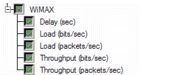
Figure 644: WiMAX Node Statistics
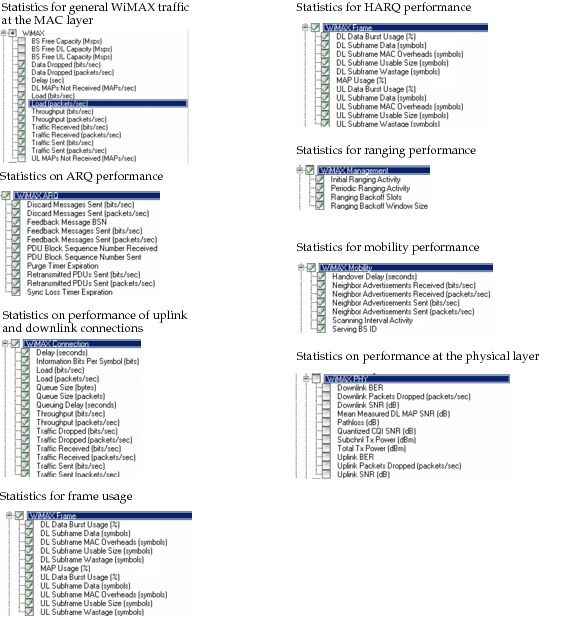
Note: Collecting bit error rate (BER) and signal-to-noise ratio (SNR) PHY statistics can significantly increase simulation run times and the size of the output vector file.
Available Reports: WiMAX
The following reports are included in the WiMAX model suite:
- BS Admission Control Statistics
- BS Admitted Connections
- BS Rejected Connections
- MS Power Consumption Report
- MS Power Saving Report
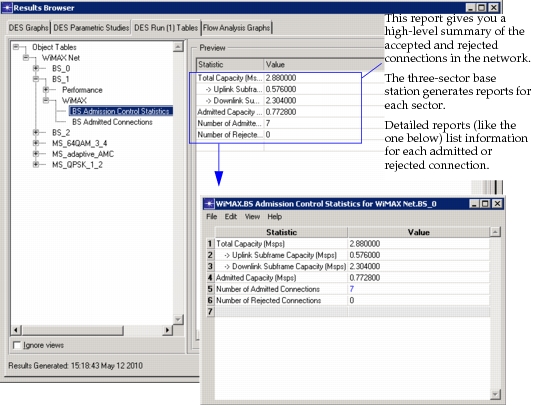
These reports are available from the DES Run Tables tab in the Results Browser dialog box. They are automatically generated for all scenarios that use WiMAX, so you do not need to choose these reports before running a simulation. An example of the Admission Control Report is shown below.
Figure 645: Admission Control Report
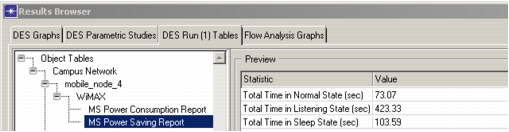
The Power Saving Report gives you the total time spent in each power saving state by the selected MS, as shown in the following figure.
Figure 646: Power Saving Report
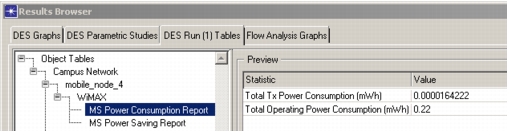
The Power Consumption Report, shown in the following figure, gives you the total transmission and operating power consumption of the selected MS. Transmission power consumption is based on the actual transmission power used by the MS. Operating power consumption is based on the SS Operational Power Settings (configured on the WiMAX Configuration Object).
Figure 647: Power Consumption Report