Configuring the RSVP Process
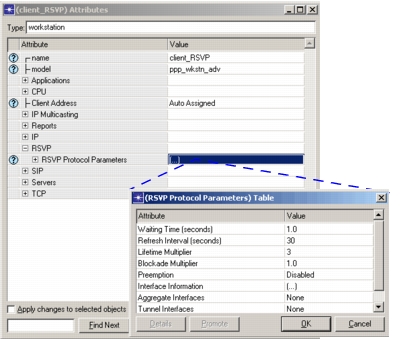
Riverbed Modeler supports RSVP on per-interface basis, RSVP can be enabled or disabled for each node’s interface. You can configure the RSVP Protocol Parameters - timers defined in the RSVP protocol [RFC 2205] on all advanced models of hosts and routers.
Procedure 105: Supporting RSVP on an Interface
-
By default, RSVP is disabled for all node models and interfaces, therefore you must set each intermediate node’s RSVP Info attribute (RSVP > RSVP Protocol Parameters > Interface Information > RSVP Status) to RSVP Enabled.
Figure 457: Enabling RSVP on an Interface
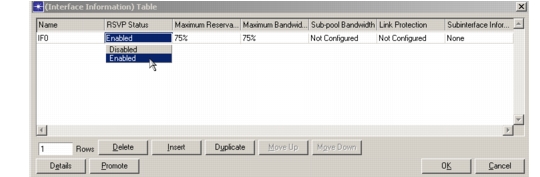
Since the RSVP protocol does not assume that all intermediate nodes support RSVP, it is not necessary to enable RSVP on each interface. However, RSVP must be enabled on the interfaces of hosts, both workstations and servers, that support RSVP. Otherwise, RSVP processing will not start for any application running on the node.
-
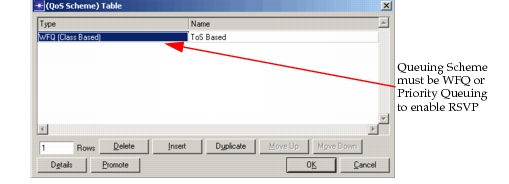
You must also configure a queuing scheme for IP QoS. The two queuing schemes supported for RSVP are weighted fair queuing (WFQ) and priority queuing. You must set the queuing scheme attribute for each interface that will participate in RSVP (IP > IP QoS Parameters > Interface Information > QoS Scheme > Type).
Figure 458: Supporting RSVP on an Interface
End of Procedure 105
Configuring RSVP Protocol Parameters
In general, RSVP Protocol Parameters are configured statically when the system administrator configures a router. You may decide to leave the default values (as specified in RFC 2205), or you may modify them to see how the protocol’s performance depends on its timers. RSVP timers are configurable on a per-node basis. The different RSVP timers are explained below.
-
Waiting Timer: To adapt to dynamic changes in the network, the RSVP process sends RSVP refresh messages when it detects a change in routing tables. On the other hand, to prevent extensive flooding of Path messages, the RSVP refresh messages should not be sent right away. Waiting Time (sec) specifies the amount of time the RVSP process waits, after a change in routing table is detected, before it sends Path refresh messages.
-
Refresh Interval and Lifetime Multiplier: RSVP takes a “soft state” approach to managing the reservation states in routers and hosts. An RSVP soft state is created and periodically refreshed by Path and Resv messages. The soft state is deleted if no matching refresh messages arrive before the expiration of the “lifetime timeout” interval. An explicit “teardown” message can also delete the state. The Refresh Interval (sec) specifies time, R, between generations of successive refresh messages for RSVP states (both Path and Resv). To prevent message synchronization and flooding, the actual value is randomly set to some value in the range [0.5R, 1.5R]. The Lifetime Multiplier determines the lifetime of RSVP states. States that were not refreshed for the value given by:
state refresh interarrival time from previous or next hop * lifetime multiplier
expire and are deleted from the state list. The corresponding reservations are adjusted to keep local state consistency in the node. There can be a Resv state only if there is a corresponding Path state.
-
Blockade Multiplier: The Blockade Multiplier determines the lifetime of blockade state, which is calculated as

Figure 459: Configuring RSVP Protocol Parameters