Configuring Applications
Attributes describing RSVP parameters set by the application are defined in two objects: the QoS Attribute Configuration object and the Application Attribute Configuration object. To run an RSVP simulation, both objects must be included in your scenario.
There are two sets of attributes defined in the QoS Attribute Configuration object: RSVP Flow Specification and RSVP Profiles. RSVP parameters for Path messages are defined in the Application Attribute Configuration object, and RSVP profiles used to make reservation decisions for a particular application are defined on hosts (workstations and servers).
It is important that RSVP attributes are configured in the order given below. The two attributes in the Quality of Service Attribute Configuration object are configured first.
Figure 450: RSVP Attributes in the QoS Attribute Configuration Object
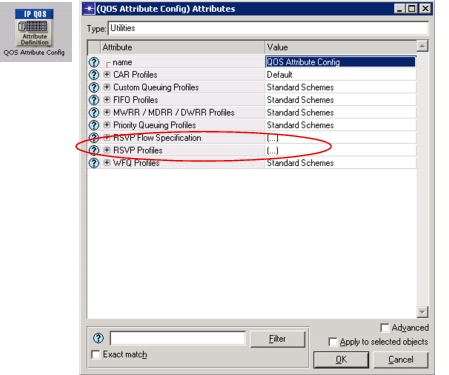
Procedure 102: Configuring the QOS Attribute Config Object
-
Create Named Data Flow Specifications: Define any data flows that will be used in the network. Specify the flow parameters shown in the Path messages. This is the flow, in terms of bandwidth and buffer size, generated by network applications. Then, specify the reservation parameters used in the network, again in terms of bandwidth and buffer size. These are the reservation parameters requested by the receiver application.
Bandwidth (bytes/sec) specifies the amount of traffic generated by the application at the IP level (including TCP/UDP and IP headers). This value is set to be the token rate in flow specification of Path and Resv messages. When the reservation is made using this flow specification, this value is set as the reserved bandwidth for the session. Bandwidth should be sufficient for traffic since insufficient bandwidth may decrease QoS for the flow.
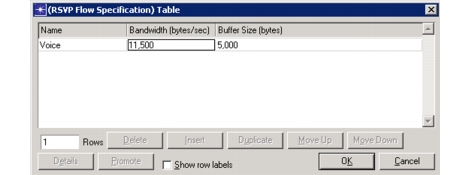
Because the controlled load service does not precisely control packet delay, any device implementing the controlled load service should not penalize bursts of packets from an application. It should be possible to buffer bursty data. The amount of data that should be buffered can be configured using the Buffer Size (bytes) attribute. This value is used as “bucket size” and is set in Path or Resv messages for the session. When a reservation is made, the Buffer Size value is the size of the buffer created for data of a particular flow (each queue in the implementation is defined by bandwidth and buffer size). The amount of data traffic sent over all time periods should not exceed r * T + b where r, is the token bucket rate which is the value of Bandwidth attribute in Riverbed Modeler, b is token bucket size which is the value of Buffer Size, and T is the measurement interval in seconds. The RSVP Flow Specification Table is shown in the following figure.
Figure 451: Data Flow Definition
-
Create RSVP Profiles: Use the QoS Attribute Configuration object’s RSVP Profiles to define the various types of RSVP reservations you plan to include in your scenario.
Figure 452: RSVP Profile Table
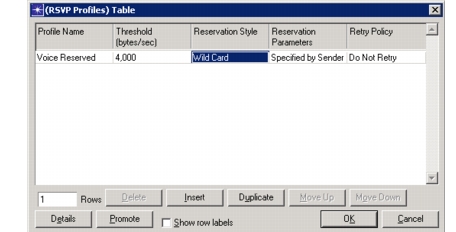
In addition to a specific QoS, each profile defines if, how, and when a receiving host requests a reservation (shown above):
- A host application will only request a reservation if a Path message indicates that the traffic load is higher than the value specified in the Threshold (bytes/sec) attribute.
- The Reservation Style attribute includes settings for fixed-filter, shared-explicit, and wildcard reservation styles.
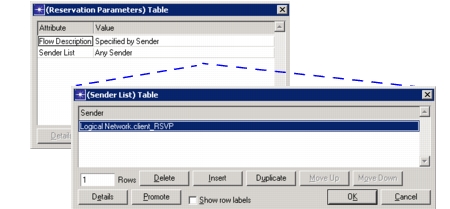
- You can use Reservation Parameters table to assign a specific data flow and sender list to the profile.
To reserve resources for traffic using parameters specified in the Path message (by the sender), you may set the value of Flow Description to “Specified by Sender”. To select different reservation parameters, define a flow description using the symbolic names specified in “RSVP Flow Specification” attribute on the QoS Attribute Configuration object.
You can either make a reservation for any sender that sends a Path message to the receiver, or you can limit the number of senders. In the latter case the name attribute of all senders must be listed in the Sender List table. If you are using subnets, you need to specify the full hierarchical name (for example top.New_York.sender1).
Figure 453: Reservation Parameter Specification
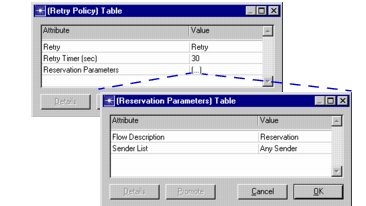
The RSVP model uses admission-control-based functions to process reservation requests; no policy control is implemented. If the network is unable to grant a reservation request, the RSVP profile’s Retry Policy compound attribute will determine how the receiving host responds. If the retry attribute is set to “Do Not Retry”, the application uses a best effort QoS. Otherwise, the request is resent according to the Retry Timer (sec) and Reservation Parameters attributes. Reservation Parameters is a compound attribute consisting of a Flow Description and a Sender List. Therefore, subsequent reservation attempts can use different reservation parameters (bandwidth, buffer size and sender list).
Figure 454: Reservation Retry Parameters
End of Procedure 102
Application parameters, including traffic and QoS parameters are defined in the Application Configuration object. The following procedure describes how to configure the traffic that is generated by the sender and used in the Path message. The receiver uses these values to make reservation decision.
Procedure 103: Specifying Data Flows for RSVP-enabled Application Sessions
-
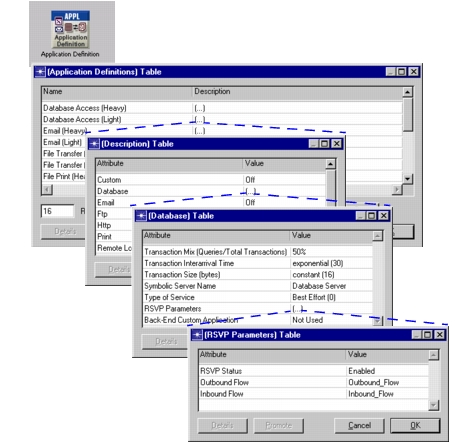
Open the node’s RSVP Parameters table for the application of interest.
-
Set RSVP Status to “Enabled” and assign data flows to the Outbound Flow and Inbound Flow attributes (as defined in the QoS Attribute Configuration object’s RSVP Flow Specification table). The Outbound Flow and Inbound Flow attributes define the application’s bandwidth and buffer size as needed for reservations on the node’s IP links. Specify the flow’s symbolic name as defined in the RSVP Flow Specification Table in the QoS Attribute Configuration table.
Just as application traffic parameters in both directions (from sender to receiver and receiver to sender) are defined in the table for a particular application, RSVP parameters are also defined in one place for both directions. Outbound Flow will be used in Path messages sent from sender to receiver, and Inbound Flow parameters will be set in Path messages generated from the receiver to the sender.
Figure 455: Specifying RSVP Data Flows for an Application
End of Procedure 103
This following procedure is used to associate an application with a particular reservation profile. The profile specified for a particular application will be used when making reservation decisions.
Procedure 104: Enabling RSVP in Receiver Applications
-
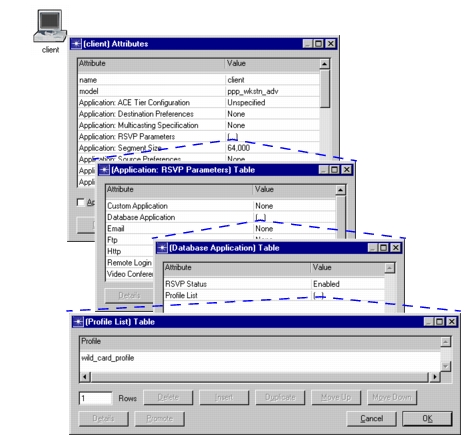
In each host node using RSVP, set the Application Definitions >
<application name>> RSVP Parameters > RSVP Status to “Enabled” (see Figure 455). Then assign one or more RSVP profiles (use their symbolic names as defined in the QoS Attribute Configuration object in Profile List attribute).If there is more than one profile specified at the host, the program will search through all configured profiles, and select the first matching profile. This will be a profile whose Threshold is lower than the bandwidth specified in the Path message, and whose Sender List contains sender of the Path message.
This step can also be used to configure the sender’s RSVP profile. This is done for instances where the sender wishes to make reservation decisions.
Figure 456: Associating a Profile with an Application
End of Procedure 104