Simulation Attributes: PNNI
The PNNI model suite has the following simulation attributes, which can be specified from the Configure Simulation dialog box.
-
ATM Dynamic Routing Protocol. Specifies the type of dynamic routing protocol used in the network. You can select Distance Vector routing (no PNNI), or one of two PNNI routing protocols: Explicit PNNI and Fast-Mode PNNI.
- Explicit PNNI. This routing simulates PNNI routing based on explicit packet flows for topology discovery using the Hello protocol, database synchronization, and flooding. Explicit packet flow requires convergence time for discovery of the network. Any change in the network, such as link failures, take a finite time for propagation through the network.
- Fast-Mode PNNI. This routing simulates PNNI routing based on automatic discovery of the network. There is no explicit packet flow and hence no convergence time for discovery of the network. Any changes in the network are immediately known by all nodes in the network.
The main difference between the two types of routing protocols are in the initial discovery on the network topology. After the routing protocol has stabilized and the entire topology is known, both routing protocols use Dijkstra’s shortest path algorithm to calculate the routes through the network based on the metrics specified.
If you are only interested in the routes taken through the network, Fast-Mode PNNI is the best option. On the other hand, if you are more interested in the transient phase of convergence of the routing protocol or the propagation of information, Explicit Mode PNNI is the better option.
-
ATM VC Routes Export. This attribute can be configured in the following ways:
- On source nodes (such as workstations) to export the path taken by each call established by the node.
- As a simulation attribute, or in the SPVX configuration utility object, to export routes for all calls set up in the network from all nodes.
Setting this attribute to Export generates a text file containing the path information for each source node. The file is placed in your primary models directory (the first directory listed in your mod_dirs preference) and is named according to the following format:
<project_name>-<scenario_name>-vc_routes.gdf
Figure 434: Exported Path Information

-
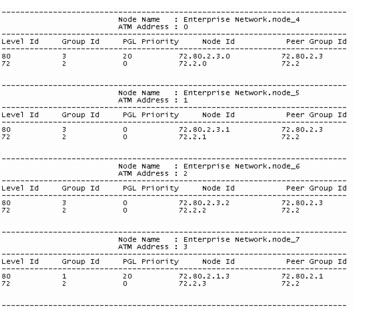
ATM Address Information Export. Setting this attribute to Export generates a text file containing the ATM addresses of each node in the network. The address information is exported to a file in your primary models directory with following naming format:
<project_name>-<scenario_name>-atm_addresses.gdf
Figure 435: Exported ATM Address Information
-
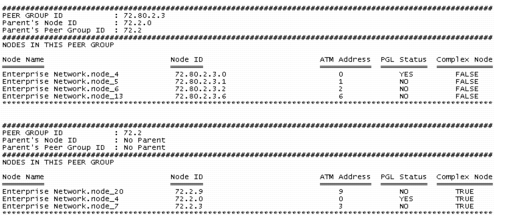
PNNI Node Information Export. Setting this attribute to Export generates a text file containing a description of each peer group in the network. The PNNI node information is exported to the following file, which is placed in your primary models directory:
<project_name>-<scenario_name>-pnni_node_info.gdf
Figure 436: Exported PNNI Node Information
- PNNI Hello Stop Time. This attribute is used to specify the end time of hello packets exchanged in the network. By default, this attribute is Enabled, so that there will be no more routing updates after the specified time. Enabling this attribute speeds up the simulation run times. If you model failure-recovery, then set this attribute to Disabled. This attribute is used only by Explicit PNNI.
- PNNI Start Time. This attribute enables you to specify when the PNNI routing protocol is activated during the simulation. The PNNI start time should be at least 1 second before the SPVX start time, whose default value is 4 sec.