Global IS-IS Configuration
If you plan to use standardized configurations across the network model for IS-IS, you can save time by setting parameters from the Protocols menu.
Figure 308: Protocols Menu - IS-IS
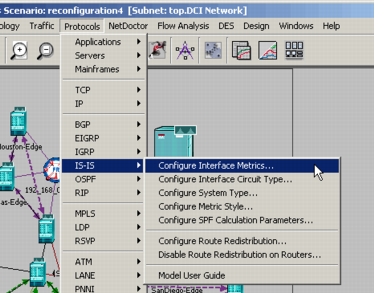
The following table lists the configuration options available from the Protocols menu.
Table 130: IS-IS Protocols Menu Options
| Menu Selection | Description |
|---|---|
| Configure Interface Metrics... | Configure IS-IS interface metrics with the specified value. Apply to • Level-1 and/or Level-2 routers • Subinterfaces • Interfaces on selected links • All interfaces Note: When you select a single link, you can configure asymmetric costs on each interface. |
| Configure Interface Circuit Type… | Configure the IS-IS circuit type on • All interfaces, with or without subinterfaces • All connected interfaces • Interfaces on selected links |
| Configure System Type… | Specify the system type (Level-1, Level-2, or Level-1-2) on all routers in the network model or a selected set. |
| Configure Metric Style… | Specify the metric style (Narrow, Wide, or Both) on all routers in the network model or a selected set. |
| Configure SPF Calculation Parameters… | Configure the frequency at which the shortest-path first (SPF) calculations are performed. Set the values for all routers or a selected set. |
| Configure Route Redistribution | Control the way advertised routes from certain protocols are redistributed into IS-IS • Enable or Disable redistribution • Set metric • Apply to all routers or a selected set |
| Disable Route Redistribution on Routers… | Disable redistribution of advertised routes into IS-IS for all routers or a selected set. |
| Model User Guide | Opens this manual. |