Configuring Low Latency Queue (LLQ)
The Low Latency Queue feature is supported for the following scheduling schemes:
- Weighted Fair Queuing (WFQ)
- Custom Queuing (CQ)
- DWRR / MDRR / MWRR (local profiles only)
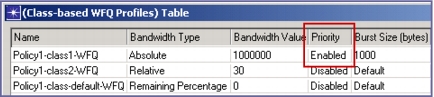
For local profiles, LLQ is enabled via setting the Priority attribute for the particular queue. The value specified under the Bandwidth Value attribute serves as a rate limit preventing the LLQ from consuming all the available bandwidth if the interface becomes congested.
Note: LLQ bandwidth limiting occurs only when the interface is congested. To specify what level of usage is treated as congestion, set the Interface Buffer Congestion Threshold attribute (in the Configure/Run DES dialog box, go to Inputs > Global Attributes). The default setting is 80% of the interface buffer capacity.
Figure 282: Enabling LLQ for Local Profiles
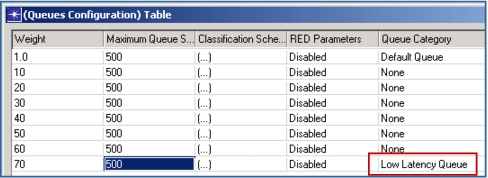
For global profiles, LLQ can be enabled by setting the Queue Category attribute to the value Low Latency Queue. The Weight attribute for such a queue is ignored, because no rate limiter is applied to LLQ queues configured via global profiles.
Figure 283: Enabling LLQ for Global Profiles
In general, only one queue can be configured as an LLQ. The only exception is the local DWRR profile, which supports two priority levels (High and Strict High) and thus allows two LLQ queues to be used.