Configuring Traffic Policies
Traffic policies can be used to group different QoS mechanisms (for example, policing and scheduling) and apply them to a specific traffic class. A traffic policy consists of a set of traffic classes and the corresponding QoS profiles assigned to each traffic class. Traffic policies are configured under the IP QoS Parameters > Traffic Policies attribute.
Figure 279: IP QoS Parameters: Traffic Policies
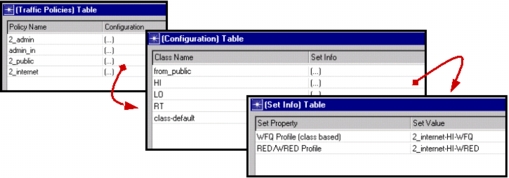
Traffic classes referenced in the policy need to be defined under the IP QoS Parameters > Traffic Classes attribute. A traffic class definition consists of a set of match criteria specifying the packet properties to be matched and the corresponding match values.
Figure 280: IP QoS Parameters: Traffic Classes
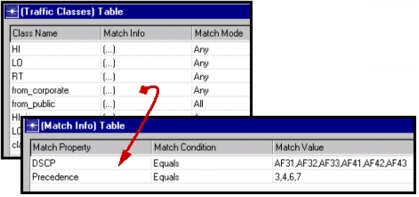
Note: Certain QoS profiles cannot be used from within a traffic policy. This is true for all global profiles. All local profiles except for Priority Queuing and Custom Queuing profiles can be used in a traffic policy. On the other hand, some QoS profiles can be used only through a traffic policy and cannot be directly referenced on the interface. These include local MDRR, DWRR, and CB-WFQ profiles.
Traffic policies are applied in the same way as QoS profiles by configuring the IP QoS Parameters > Interface Information > QoS Info attribute for a particular IP interface. In the following figure, the Serial 1/0 interface uses both an Inbound Traffic Policy and an Outbound Traffic Policy.
Figure 281: IP QoS Parameters: Interface Information: QoS Info
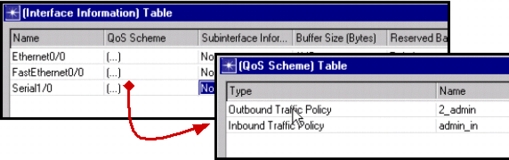
An inbound policy is applied to traffic entering the node via the specified interface, while an outbound policy is applied to traffic leaving the node through that interface. Some QoS schemes are not supported in both directions. Scheduling and Congestion Avoidance is supported only in the outbound direction.