Customizing Node Models with the Advanced Wireless Package
You can customize node models by copying and pasting the advanced wireless package into an existing wireless node model, replacing the physical layer transmitter and receiver, as shown in the following figure.
Note: This is the second use case described in Advanced Wireless Package Use Cases.
Figure 11: Integrating the Advanced Wireless Package Module in a Custom Node Model
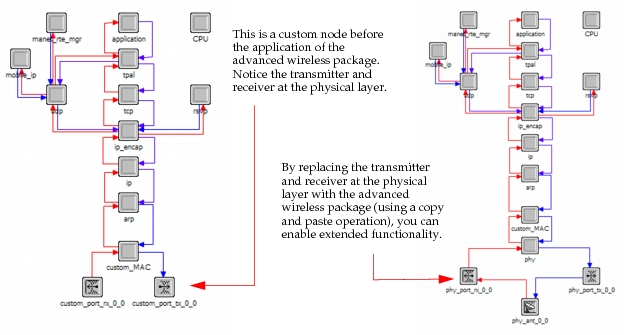
In this use case, no functions from APIs are being used in the MAC module. Packets transmission will be handled by the regular op_pk_send() kernel procedure (or similar packet kernel procedures) that the original MAC module code already was using to send packets to the original radio transmitter and receiver.
Key Concept— If you have spent time customizing your wireless node models (for example, customizing the default radio pipeline), you must consider these customizations when integrating the advanced wireless package into your models. You must migrate these customizations manually or adapt the model in which you added the advanced wireless package to include those customizations.
Using Built-In Advanced Wireless Package Node Attributes
Any advanced wireless package attributes can be promoted in the new custom node, allowing you to set custom values for each promoted attribute. Attributes not promoted will simply use default values. The PHY module (that is, the wrls_phy process model) generally retains individual attributes so they can be promoted independently. For an example, see Using API Functions with a Custom Client Module.
Key Concept— For the purposes of this document, a "client module" is defined as the module that uses the advanced wireless package for any purpose (such as transmissions, receptions, or monitoring), for example a custom MAC module.
For more information about attribute promotion, see "Attribute Promotion" on page 112 in the Modeling Concepts section of the user guide.