License Manager Operations within GUI
When no license server is selected in the treeview, you can perform the following License Manager operations:
Export Tree (Button)
The license tree can be exported to a tab-delimited text file using the Export Tree button. This feature is useful for troubleshooting.
Product Modules (Modules Menu)
Note: This section applies to Riverbed analysis software only.
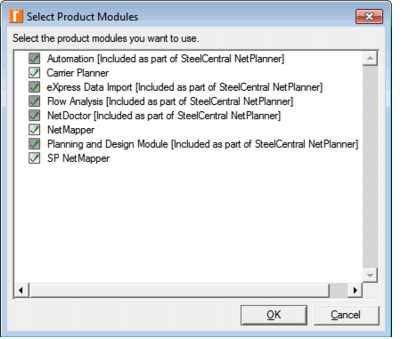
You can specify which product options to use by choosing Modules > Product Modules in the License Manager and selecting the product options from the list. Only the product options for which you have purchased licenses can be selected from the list. (Specialized model licenses are not listed here, but will be used when discrete event simulations are run). Notice that modules included as part of a solution are already selected and cannot be deselected.
Figure 4: Product Modules Example
License Server Elements
The following table lists the elements of the license servers displayed in the License Manager window.
Table 3: License Server Elements
| Field | Description |
|---|---|
| Requested Server | This branch shows the server from which the program can request and be issued licenses. You specify this server during installation, by selecting it from within the License Server tree, or by listing the server name and port in your Preferences file in the license_server and license_port preferences, respectively. |
| Operating System | The OS version of the License Server is displayed in the tree. |
| Build | The version and build of the software installed on the license server are displayed in the tree. |
| Security | Shows whether there is an admin_auth or user_auth file in place to control license management and usage.For more information, see "Restricting License Users". |
| Host IP Address | The "Host IP address" given for each server is the return address of the IP packet received by the License Manager. This is not necessarily the actual IP address of the license server but could be the address of the firewall port through which the license server is accessed, for example. |
| System Date | The system date of the License Server is displayed. |
| License File Path | The full path of the license file location is displayed in the tree. |
| License File | Shows the number and type of licenses installed on the server. For more information about license attributes, see Table 1 "License Attribute Definitions" on page 4. |
| Local Servers | Shows other license servers running on your computer. |
| Other Servers on this IP Network | Shows other license servers running on your IP network segment. |