Starting the License Manager GUI
This section describes methods for starting the License Manager for Riverbed analysis software.
Note: This section pertains to Riverbed analysis software and AppInternals (with Transaction Trace Analyzer). Transaction Trace Analyzer is a separate client that analyzes AppInternals transaction trace files. Version 3.0 and later of the Transaction Trace Analyzer (formerly named Panorama Transaction Visualizer) includes the License Manager GUI, which is easier to use than the command line license manager. To download Transaction Trace Analyzer with the license manager GUI, go to https://support.riverbed.com and go to the Product Downloads page for AppInternals.
To start the license manager from within Riverbed analysis software or Transaction Trace Analyzer, use the following procedure.
Procedure 1: Starting the License Manager from within Transaction Trace Analyzer or Riverbed analysis software
- Launch the Riverbed analysis software or Transaction Trace Analyzer.
- Choose License > License Management. Result: The License Manager opens.
Note: For Riverbed analysis software, at least one license in the license file will be in use. The Transaction Trace Analyzer is not licensed, so invoking the license manager in this way will not use a license.
Starting the Application and License Manager in Manage License Mode
You can start the License Manager and Riverbed analysis software in the manage license mode, as described in Procedure 2 (Windows) and Procedure 3 (Linux).
Note: This section does not pertain to AppInternals or NetCollector.
You can start both the License Manager and Riverbed analysis software from the command line, as described in Procedure 4.
In this mode, the Riverbed analysis software does not use a license and has only limited functions. You will be able to use some system menu functions, but none of the editors.
This mode is useful when you are performing license management operations only. You must use this mode if you are deregistering all licenses (see Deregistering a License or Clearing a License File), because the License Manager will not allow you to deregister a license that is in use. Therefore, if you open the License Manager from within the Riverbed analysis software, as described in Procedure 1, a license to run the application is already in use.
Use the following procedure to start the License Manager graphical user interface in manage license mode from Windows.
Note: This procedure does not pertain to AppInternals or NetCollector.
Procedure 2: Starting the License Manager GUI (Windows)
- Select Start > All Programs > Riverbed_application_name > License Manager. Result: The License Manager opens in one window. The application opens in another window but has limited functions.
Use the following procedure to start the License Manager in manage license mode from Linux.
Note: This procedure does not pertain to AppInternals or NetCollector.
Procedure 3: Starting the License Manager GUI (Linux)
- Enter the following command:
op_license_managerResult: The License Manager opens in one window. The application opens in another window but has limited functions.
Starting the Application and License Manager from the Command Line
Use the following procedure to start the License Manager GUI from the command line.
Procedure 4: Starting the License Manager GUI from the Command Line
- Launch the program (for example, modeler) with the manage_licenses preference:
<program> -manage_licensesResult: The License Manager opens in one window. The application opens in another window but has limited functions.
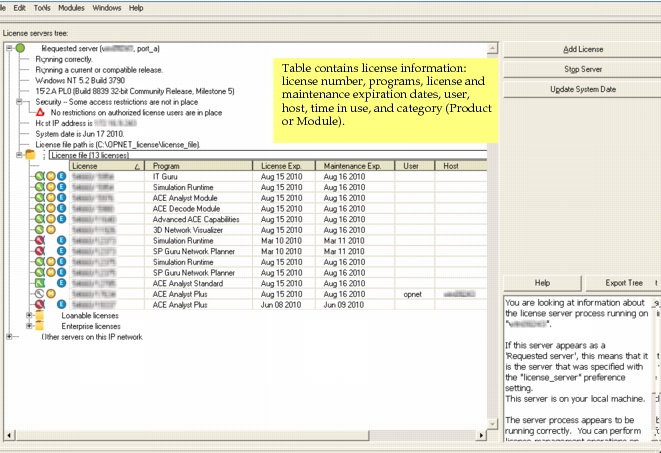
The License Manager GUI displays information about the license servers and licenses in the network in a treeview, like the one shown in the following figure. A table containing information about each license is included under the "License file" treeview item.
Figure 3: License Manager Window